> ## Documentation Index
> Fetch the complete documentation index at: https://docs.flowla.com/llms.txt
> Use this file to discover all available pages before exploring further.
# AI Agents
> Add AI-powered content generation to your workflows — write follow-ups, summarise calls, and personalise rooms automatically.
AI Agents bring intelligence to your workflows, generating personalised content on the spot so your team can move faster without losing the human touch.
***
### Why use AI Agents?
Most sales and CS teams spend too much time on things like writing follow-up emails, pulling together business cases, or summarising call takeaways. AI Agents handle these steps for you — based on what actually happened, every time.
That means you can:
* Send better, more personalised follow-ups faster
* Keep deals moving even when you're back-to-back
* Give your CS team rich context without manually writing it up
* Scale your process without making it feel templated
***
### What can AI Agents do?
Drop an AI Agent anywhere in your workflow before an action. It reads the situation and generates something ready to use.
Examples:
* Write a personalised follow-up email based on form responses or room activity
* Generate a business case from your call transcript
* Summarise a kickoff form and share the highlights with your CS team
* Notify your team with enriched contact info and engagement insights
* Personalise a proposal or mutual action plan using CRM data
You can review and approve any AI-generated content before it goes out by routing the workflow through your [Smart Queue](/automations/smart-queue).
***
### Real examples
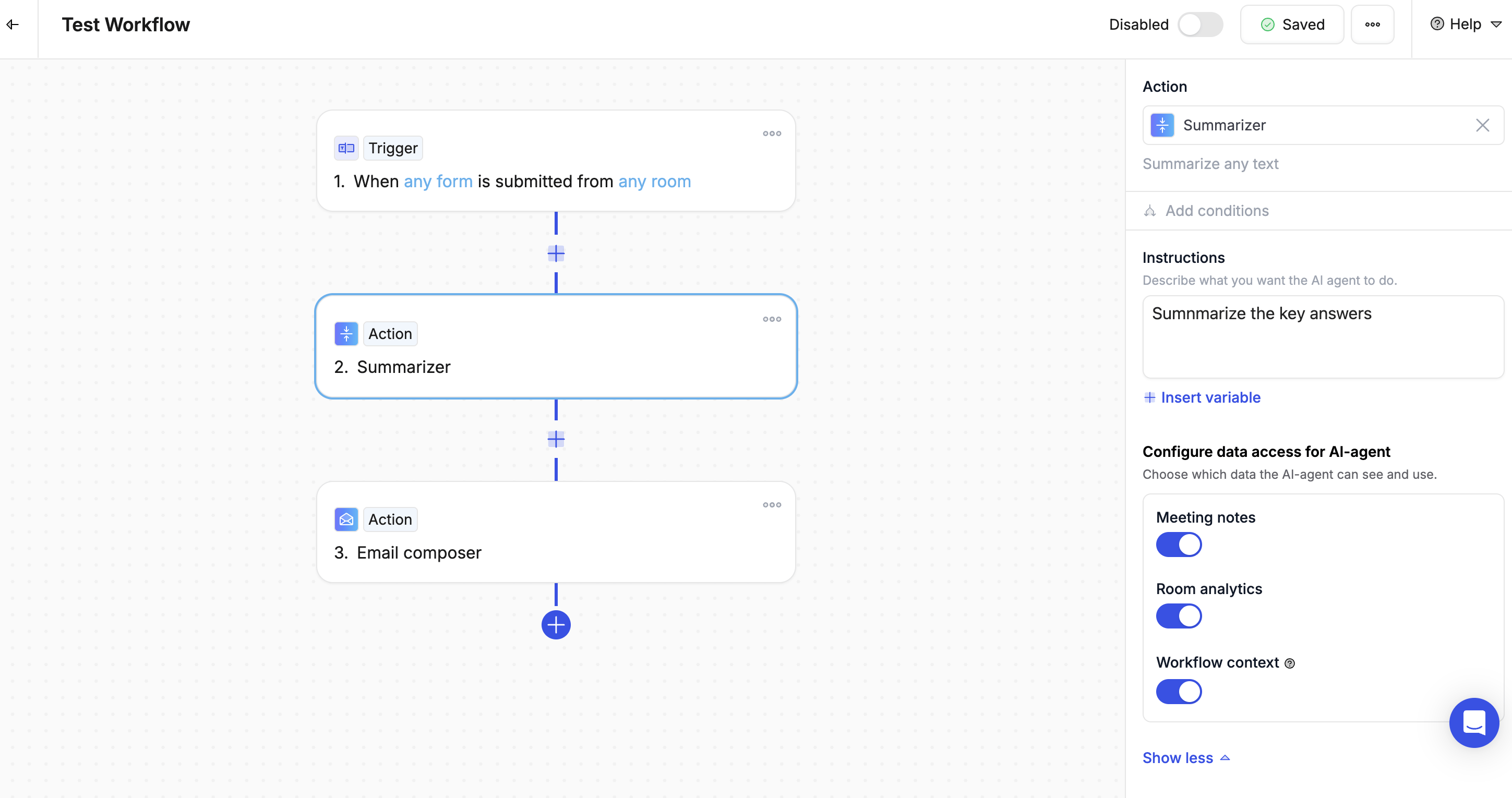
#### Example 1: Form submitted → Summary sent to team
* **Trigger**: Kickoff form submitted
* **AI Agent**: Summarise the key answers
* **Action**: Email or Slack the summary to your CS team
 #### Example 2: Room not viewed → Nudge email
1. **Trigger**: Room not opened after 3 days
2. **AI Agent**: Write a friendly follow-up with key next steps
3. **Action**: Send the email from the rep's work address, personalised with the contact's name and room link
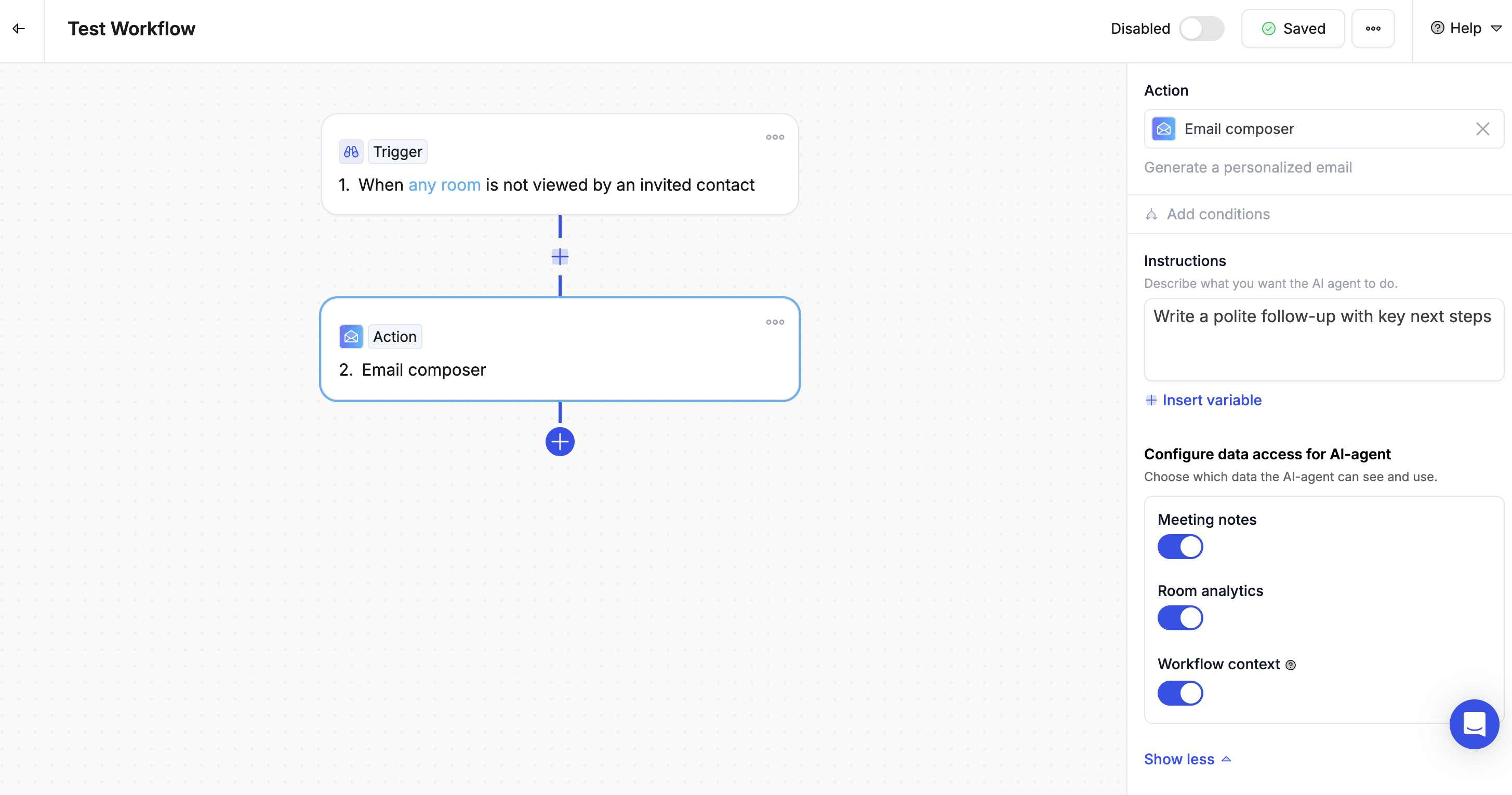
#### Example 2: Room not viewed → Nudge email
1. **Trigger**: Room not opened after 3 days
2. **AI Agent**: Write a friendly follow-up with key next steps
3. **Action**: Send the email from the rep's work address, personalised with the contact's name and room link
 #### Example 3: Call transcript → Business case
1. **Trigger**: Gong call recording processed
2. **AI Agent**: Generate a business case from the key discussion points
3. **Action**: Add it to the room and notify the deal owner
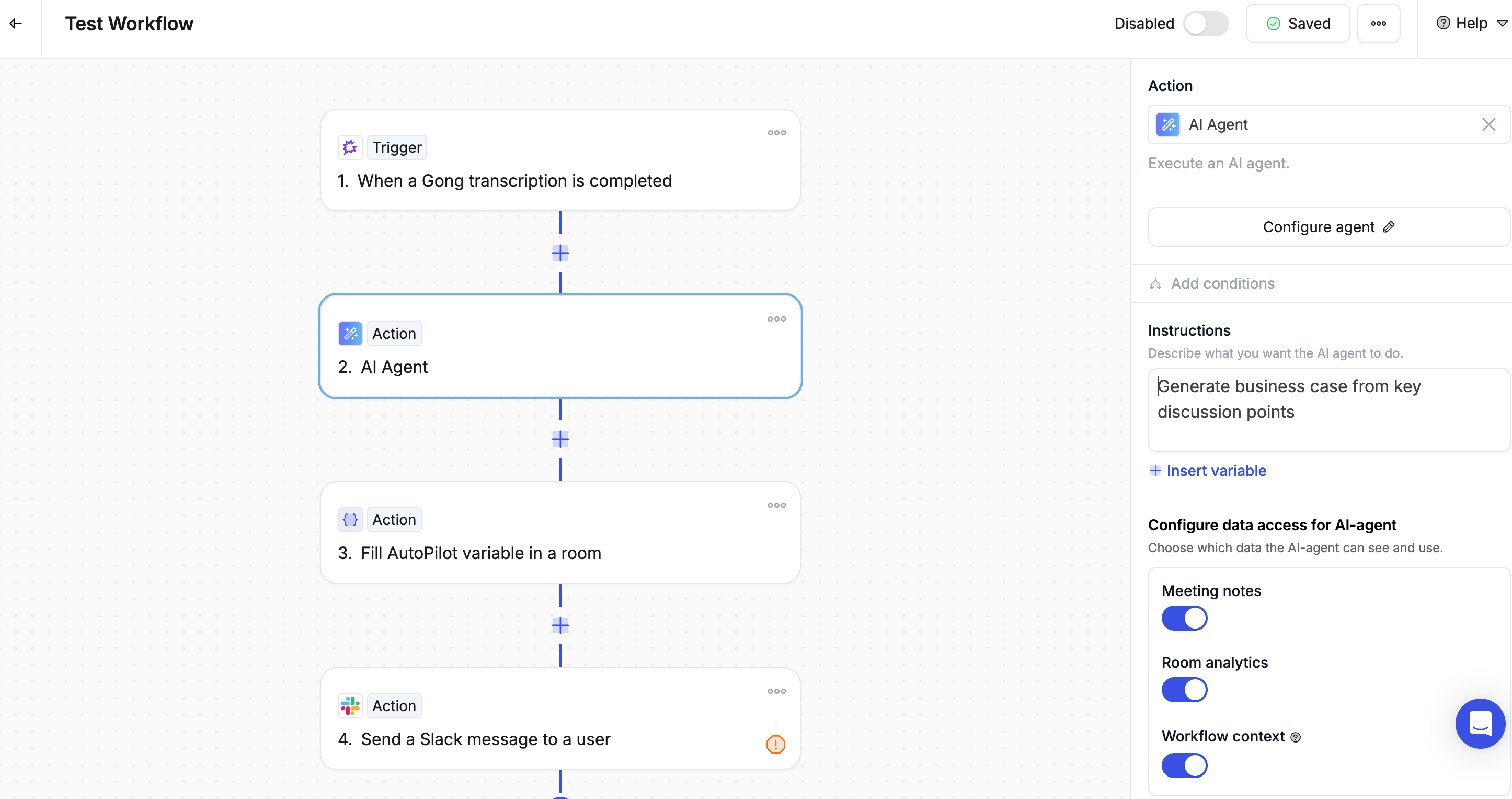
#### Example 3: Call transcript → Business case
1. **Trigger**: Gong call recording processed
2. **AI Agent**: Generate a business case from the key discussion points
3. **Action**: Add it to the room and notify the deal owner
 ***
### Writing a good prompt
The better your instructions, the better the output. A strong prompt includes five things:
1. **Role** — Who should the AI write as?
2. **Task** — What should it produce?
3. **Context** — What information should it use? (Use variables to pull in real data)
4. **Constraints** — How long? What tone? What format?
5. **Example** — What does a good result look like?
**Example prompt:**
```
You are a sales rep at {{organization_name}}.
Write a brief follow-up email to {{primary_contact_first_name}} at
{{target_company_name}}. The room was shared 3 days ago but hasn't
been viewed yet.
Keep it friendly, under 100 words, and include a soft call-to-action
to check out the room.
Sign off as {{room_creator_full_name}}.
```
Include a short example of the output you want in your prompt — a concrete example produces better results than a long description alone.
***
### Best practices
1. **Be specific** — Vague instructions produce vague results
2. **Add context** — More relevant data leads to better personalisation
3. **Set constraints** — Always specify the length, tone, and format you want
4. **Use the Smart Queue** — Review AI-generated messages before they reach customers
5. **Refine over time** — Test your prompts and tweak them based on the output you get
***
### Writing a good prompt
The better your instructions, the better the output. A strong prompt includes five things:
1. **Role** — Who should the AI write as?
2. **Task** — What should it produce?
3. **Context** — What information should it use? (Use variables to pull in real data)
4. **Constraints** — How long? What tone? What format?
5. **Example** — What does a good result look like?
**Example prompt:**
```
You are a sales rep at {{organization_name}}.
Write a brief follow-up email to {{primary_contact_first_name}} at
{{target_company_name}}. The room was shared 3 days ago but hasn't
been viewed yet.
Keep it friendly, under 100 words, and include a soft call-to-action
to check out the room.
Sign off as {{room_creator_full_name}}.
```
Include a short example of the output you want in your prompt — a concrete example produces better results than a long description alone.
***
### Best practices
1. **Be specific** — Vague instructions produce vague results
2. **Add context** — More relevant data leads to better personalisation
3. **Set constraints** — Always specify the length, tone, and format you want
4. **Use the Smart Queue** — Review AI-generated messages before they reach customers
5. **Refine over time** — Test your prompts and tweak them based on the output you get