> ## Documentation Index
> Fetch the complete documentation index at: https://docs.flowla.com/llms.txt
> Use this file to discover all available pages before exploring further.
# Room analytics
> Track engagement and activity for individual rooms in real-time.
## TL;DR
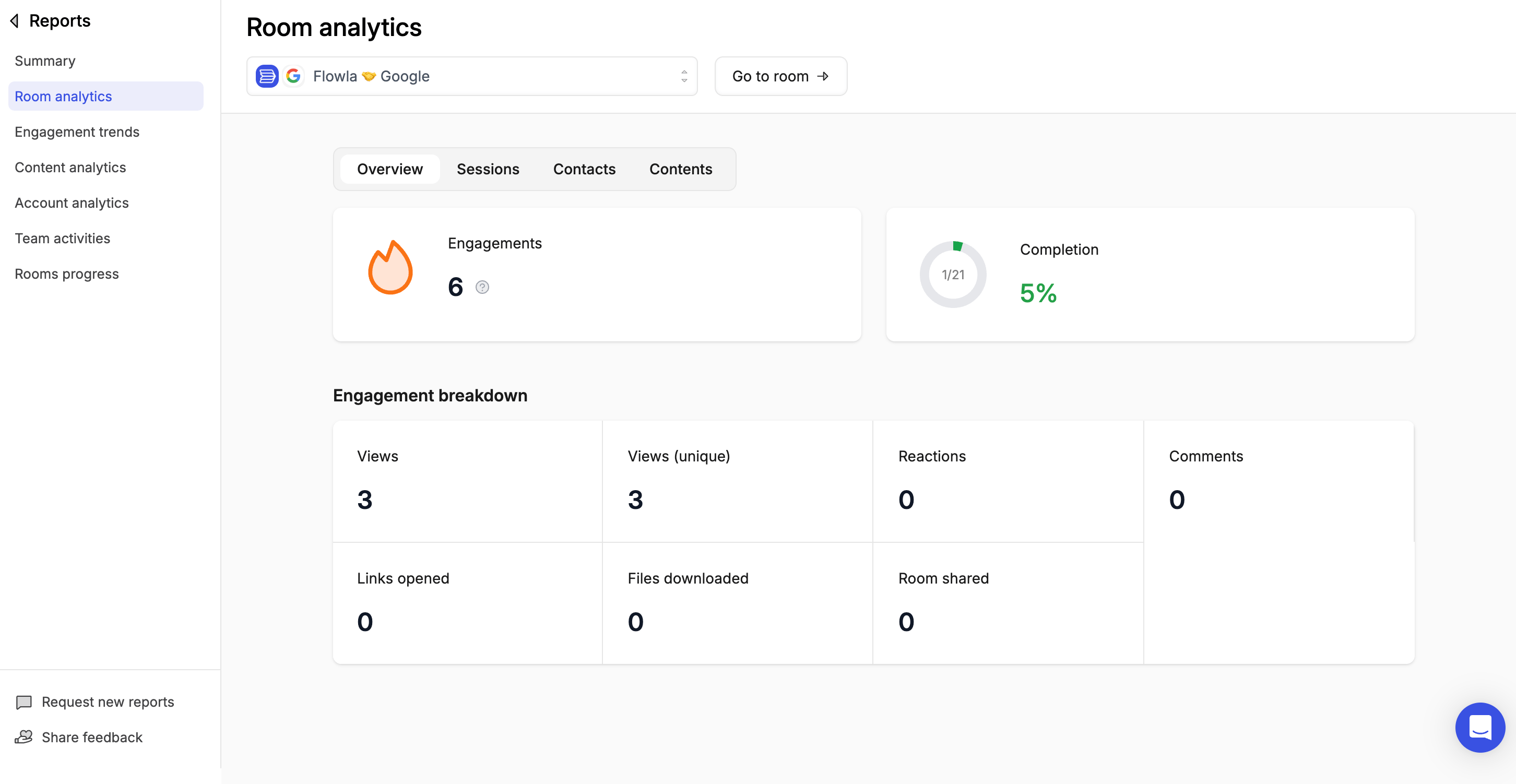
Room analytics show you exactly how prospects engage with your rooms, who's viewing, what they're looking at, and when they're active. Without this visibility, you're guessing when to follow up and who the real decision-makers are. With Flowla analytics, you know.
 ***
## Why room analytics matter
Use this data to prioritise follow-ups, identify stuck deals, and understand what content actually resonates.
* **Which deals are hot** — and which have gone cold
* **Who the key stakeholders are** in each deal
* **What content gets the most attention**
* **When to follow up** for maximum impact
***
## Key metrics to watch
### Engagement signals
| Metric | What it tells you |
| ------------------- | ---------------------------------------------------- |
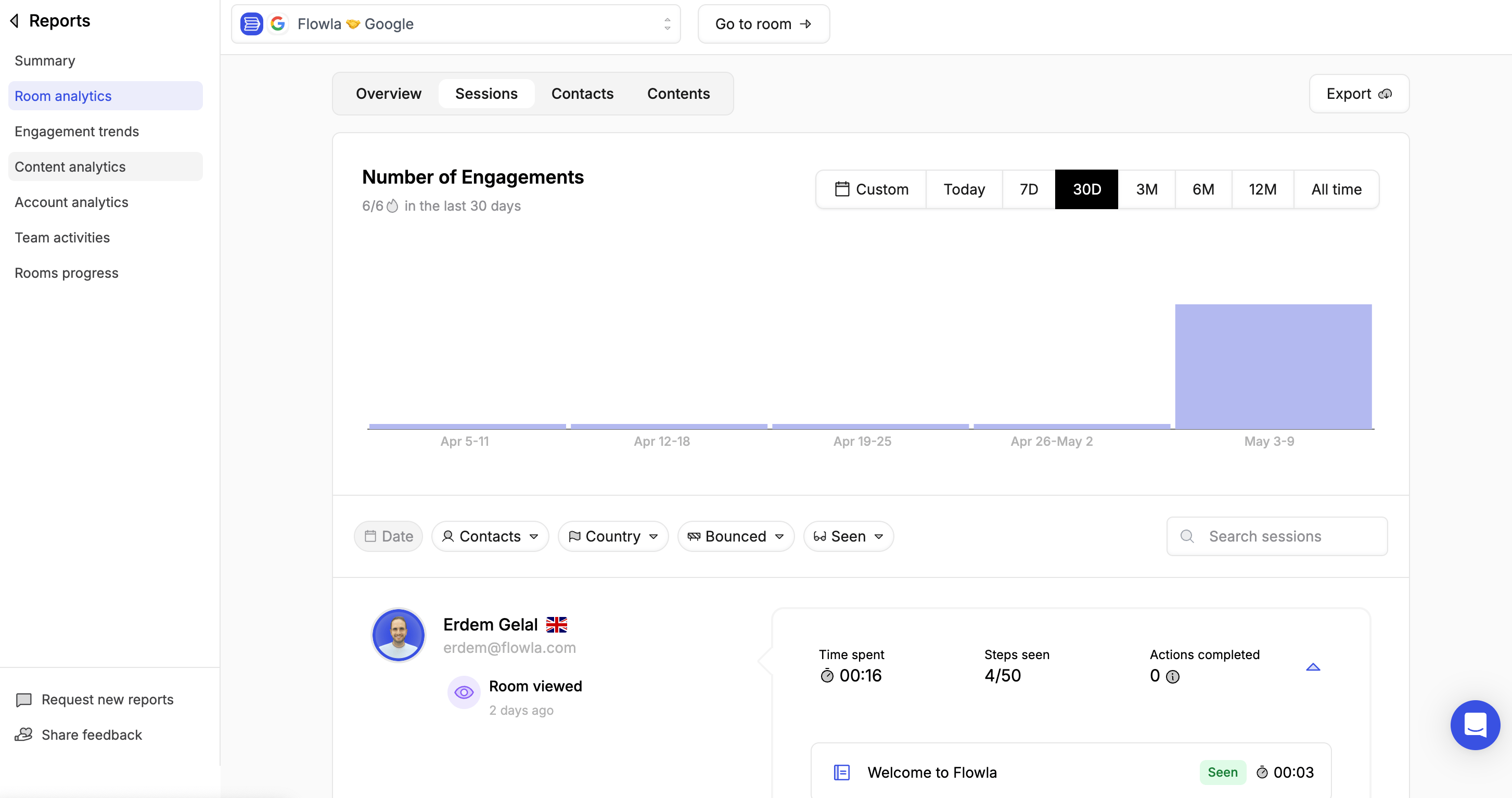
| **Room views** | Who viewed the room and how often |
| **Time spent** | How long visitors engaged with each piece of content |
| **Last activity** | When the room was most recently opened |
| **Tasks completed** | Progress on mutual action plan items |
| **Forms submitted** | Whether customers have submitted their information |
***
## Why room analytics matter
Use this data to prioritise follow-ups, identify stuck deals, and understand what content actually resonates.
* **Which deals are hot** — and which have gone cold
* **Who the key stakeholders are** in each deal
* **What content gets the most attention**
* **When to follow up** for maximum impact
***
## Key metrics to watch
### Engagement signals
| Metric | What it tells you |
| ------------------- | ---------------------------------------------------- |
| **Room views** | Who viewed the room and how often |
| **Time spent** | How long visitors engaged with each piece of content |
| **Last activity** | When the room was most recently opened |
| **Tasks completed** | Progress on mutual action plan items |
| **Forms submitted** | Whether customers have submitted their information |
 ### Content performance
| Metric | What it tells you |
| ---------------------- | ----------------------------------------------- |
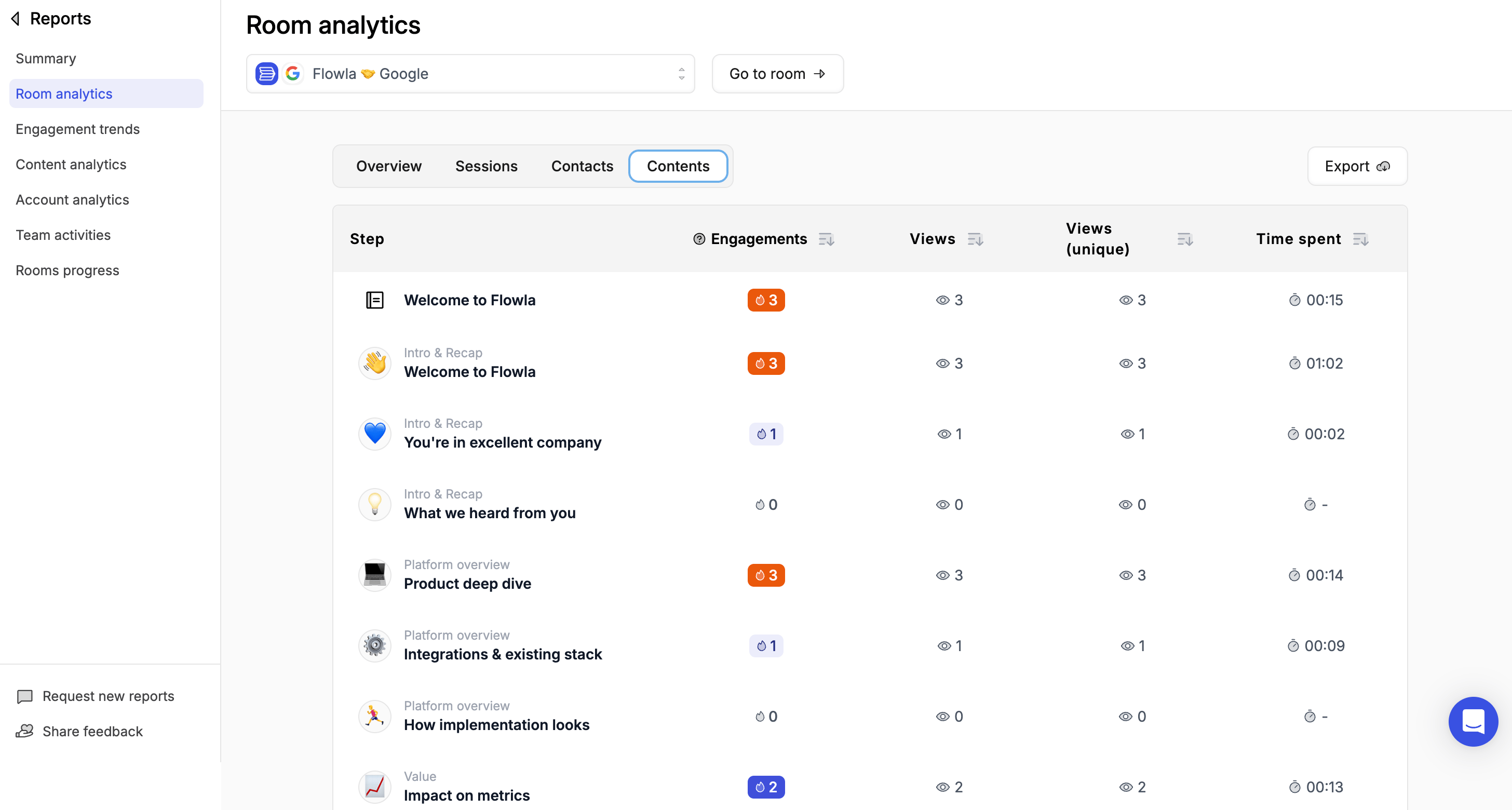
| **Asset views** | Which files and materials get opened |
| **Downloads** | What content prospects save locally |
| **Section engagement** | Which parts of your room get the most attention |
### Content performance
| Metric | What it tells you |
| ---------------------- | ----------------------------------------------- |
| **Asset views** | Which files and materials get opened |
| **Downloads** | What content prospects save locally |
| **Section engagement** | Which parts of your room get the most attention |
 ***
## Tracking contacts
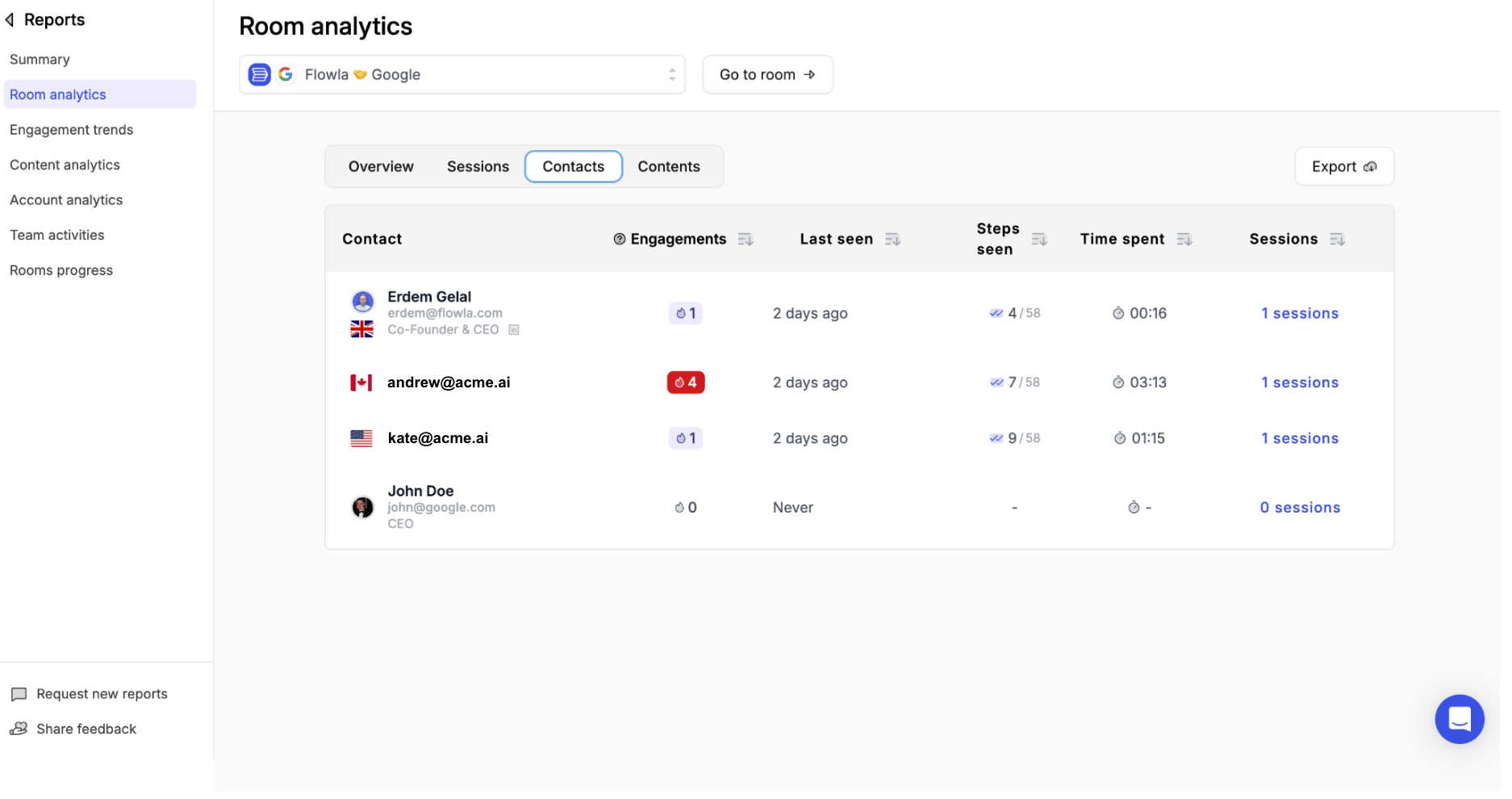
Flowla gives you a per-contact breakdown for every room, so you can see exactly where each stakeholder stands. This makes it easy to spot your champions, identify silent stakeholders, and time your outreach with confidence.
For each contact you can track:
| Metric | Description |
| --------------- | ------------------------------------------ |
| **Last active** | The last time they opened the room |
| **Engagements** | Total number of interactions with the room |
| **Steps seen** | Which sections they've visited |
| **Time spent** | How long they've been engaged |
| **Sessions** | How many separate visits they've made |
***
## Tracking contacts
Flowla gives you a per-contact breakdown for every room, so you can see exactly where each stakeholder stands. This makes it easy to spot your champions, identify silent stakeholders, and time your outreach with confidence.
For each contact you can track:
| Metric | Description |
| --------------- | ------------------------------------------ |
| **Last active** | The last time they opened the room |
| **Engagements** | Total number of interactions with the room |
| **Steps seen** | Which sections they've visited |
| **Time spent** | How long they've been engaged |
| **Sessions** | How many separate visits they've made |
 ***
## Using analytics to prioritise
**Hot deals** — Rooms with recent activity and multiple stakeholders viewing indicate active evaluation. These are your priority follow-ups.
**Cold deals** — Rooms with no activity for 7+ days may need a nudge. Use this signal to re-engage before interest fades entirely.
**Champion identification** — The contacts who view most frequently are likely your internal champions — the people advocating for you on the inside.
**Content optimisation** — If certain assets are consistently ignored, consider replacing or repositioning them in the room. See [Content analytics](/reports-analytics/content-analytics) to identify underperforming assets across all rooms.
**Account-level view** — To see engagement aggregated across all rooms for a single company, visit [Account analytics](/reports-analytics/account-analytics).
***
## Troubleshooting
**Likely cause:** The prospect accessed the room from different browsers or devices, each creating a separate session.
**Fix:** This is expected behaviour. Each device or browser session is tracked separately. Enable the email gate to tie sessions to a named person for cleaner data.
**Likely cause:** The visitor chose not to enter their email, or accessed the room before the gate was enabled.
**Fix:** The email gate only captures details going forward after it's enabled. Past sessions remain anonymous. Make sure the gate is set to **Required**, not Optional.
**Likely cause:** There's no native CSV export in the analytics UI.
**Fix:** Use the Flowla API to pull engagement data programmatically. Contact support if you need a manual data export.
**Likely cause:** This view isn't immediately obvious in the UI.
**Fix:** Open the room and go to the **Progress** or **Overview** tab. Each action step shows completion status per participant.
***
## Using analytics to prioritise
**Hot deals** — Rooms with recent activity and multiple stakeholders viewing indicate active evaluation. These are your priority follow-ups.
**Cold deals** — Rooms with no activity for 7+ days may need a nudge. Use this signal to re-engage before interest fades entirely.
**Champion identification** — The contacts who view most frequently are likely your internal champions — the people advocating for you on the inside.
**Content optimisation** — If certain assets are consistently ignored, consider replacing or repositioning them in the room. See [Content analytics](/reports-analytics/content-analytics) to identify underperforming assets across all rooms.
**Account-level view** — To see engagement aggregated across all rooms for a single company, visit [Account analytics](/reports-analytics/account-analytics).
***
## Troubleshooting
**Likely cause:** The prospect accessed the room from different browsers or devices, each creating a separate session.
**Fix:** This is expected behaviour. Each device or browser session is tracked separately. Enable the email gate to tie sessions to a named person for cleaner data.
**Likely cause:** The visitor chose not to enter their email, or accessed the room before the gate was enabled.
**Fix:** The email gate only captures details going forward after it's enabled. Past sessions remain anonymous. Make sure the gate is set to **Required**, not Optional.
**Likely cause:** There's no native CSV export in the analytics UI.
**Fix:** Use the Flowla API to pull engagement data programmatically. Contact support if you need a manual data export.
**Likely cause:** This view isn't immediately obvious in the UI.
**Fix:** Open the room and go to the **Progress** or **Overview** tab. Each action step shows completion status per participant.