> ## Documentation Index
> Fetch the complete documentation index at: https://docs.flowla.com/llms.txt
> Use this file to discover all available pages before exploring further.
# Asset intelligence
> REX's structured understanding of every asset in your library, covering persona, sales stage, competitors, and freshness, so it can recommend the right content rather than a keyword match.
**Asset intelligence** is REX's structured understanding of every piece of content in your [library](/library/asset-library-overview): decks, one-pagers, case studies, battlecards, YouTube and Loom videos, web links and embeds, essentially anything you've uploaded.
Instead of a generic AI summary, each asset gets a typed, structured breakdown: what it's about, who it's for, what stage of the sales cycle it fits, which competitors it counters, and how fresh it still is.
This is what turns your library from a folder of files into something REX can search by meaning and recommend from, both in [REX Chat](/rex/chat) and in [signals](/rex/signals).
***
## Generating intelligence
An asset gets analysed one of two ways:
| Method | When it runs |
| ----------------- | ----------------------------------------------------------------------------------------------------------------------------- |
| **Automatically** | When an asset is uploaded to the library, if your org has turned on **Auto-generate asset intelligence** in Library settings. |
| **On demand** | Any time. Open an asset's details and click **Generate asset intelligence**, or **Regenerate** if it's already been analysed. |
On-demand generation works regardless of whether the org-wide toggle is on, so you can always analyse a specific asset you need REX to know about right now.
***
## What gets extracted
The result is a structured profile of the asset, not free text:
* **Overview**: purpose, description, asset type, the product it's about, category, region, industries, and segments it applies to, plus a **freshness score**.
* **Personas**: who it speaks to (role, seniority), their pain points, and how well the asset fits them.
* **Sales stages**: which stage or stages of the sales cycle it's suited for, only flagged when the content clearly supports it.
* **Features & integrations**: capabilities and third-party tools it showcases.
* **Competitors**: who it positions against.
* **Solutions**: the business outcomes or value pillars it argues for.
Every one of these comes with **evidence**, the specific passage or reasoning behind that label, so you can see why REX described an asset the way it did. It's the same traceability you get on a [Deal Score](/rex/deal-score) or [MEDDPICC](/rex/meddpicc) score.
***
## Freshness score
Freshness isn't an AI judgment. It's calculated directly from the asset's last-updated date, with full marks for anything updated in the last 3 months tapering to zero past 3 years old. It's shown as a score, an age label ("3 mo ago"), and a status: **fresh**, **stale**, or **outdated**.
A great case study from two years ago might be quietly out of date. Freshness surfaces that before you send it to a prospect, which matters most for anything with pricing, product screenshots, or competitive claims.
***
## How search is built on top of this
When you or REX search the library by meaning rather than by filename or folder, that search runs over the *content of the intelligence graph*, meaning the personas, features, and use cases that were extracted, rather than a raw keyword match against the file itself.
That's what makes a query like "find a case study for a fintech buyer" work even if the word "fintech" never literally appears in the file.
### How REX Chat uses it
REX Chat can search your library by keyword, by meaning, by type, by tag, by folder, by who uploaded it or when. It pulls the structured intelligence for a specific asset when it needs the detail (who it's for, what stage it fits, how fresh it is) before recommending or attaching it.
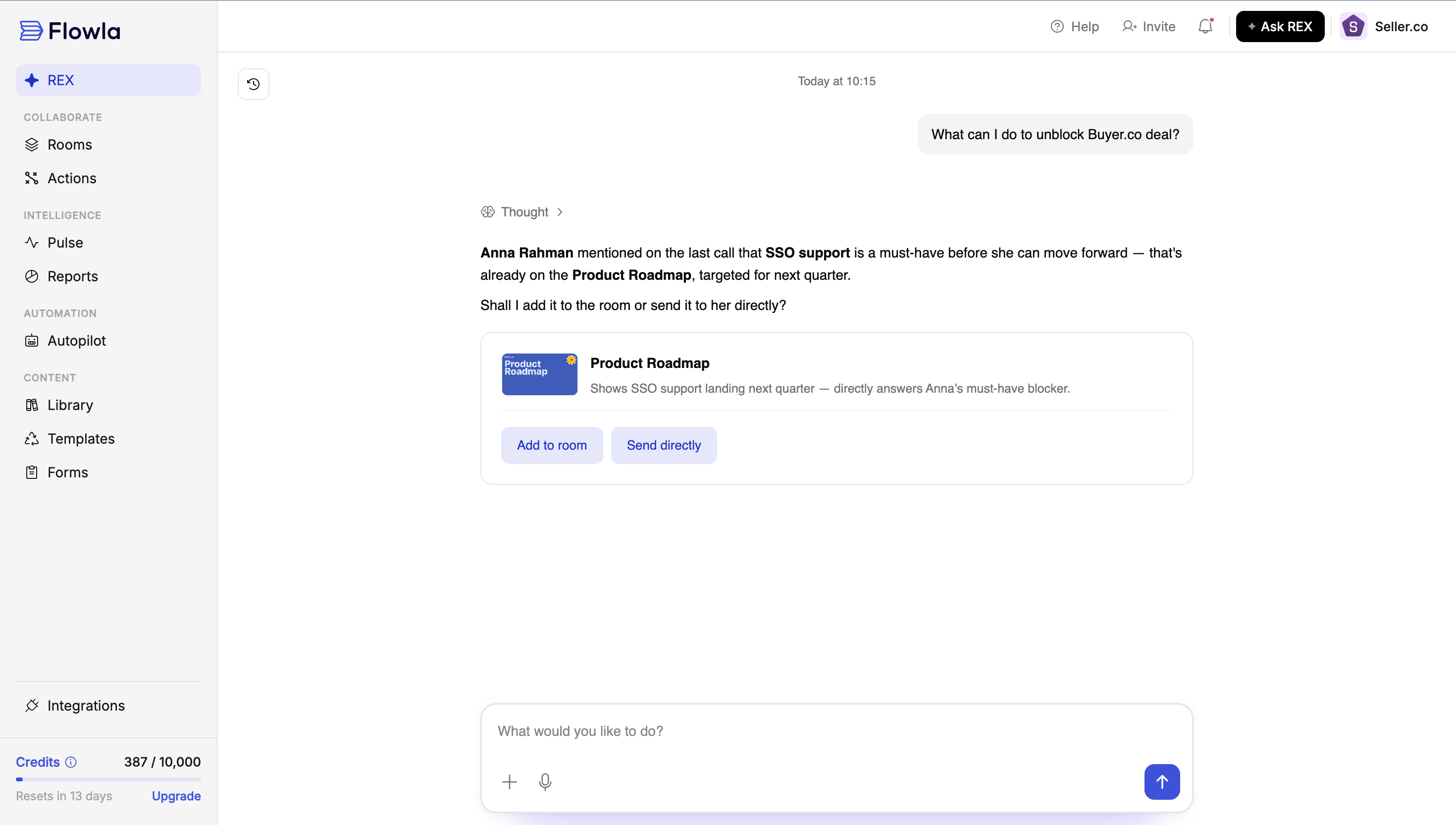 ### How signals use it
REX has access to your library while it's generating [signals](/rex/signals), so a recommended action can be genuinely concrete rather than generic advice. It can surface a specific case study or security one-pager that fits the persona and stage a signal is about, and prepare a share link for it, rather than just telling you to "share relevant content."
The asset a signal points to isn't a hardcoded link. REX finds it at the moment the signal is generated, the same way it would if you'd asked directly in chat.
***
## Credit cost
Generating asset intelligence spends [credits](/plans-billing/credits). The Library settings toggle says so explicitly: *"Spends credits based on the asset type and size."*
| Step | Cost |
| ----------------------------------- | ---------------------------------------------------------------------------------- |
| **Parsing** | 1 credit per page for documents, or 1 credit per minute for audio and video assets |
| **Building the intelligence graph** | A flat cost on top of parsing, regardless of asset size |
In short, bigger or longer assets cost more to analyse, mainly because of the parsing step, while the graph-building step itself is a fixed add-on.
If your org doesn't have enough credit balance to cover generation, it's skipped rather than run partway.
This is different from [REX Chat](/rex/chat) and from signal generation, which don't currently spend org credits. Asset intelligence generation is the one place in this trio where usage is metered, since it involves parsing and analysing a whole file rather than reasoning over data REX already has.
***
## How different roles use this
* Turn on **Auto-generate asset intelligence** in Library settings so new uploads are searchable and recommendable right away, without a manual step per file.
* If you upload something you need REX to use immediately, click **Generate asset intelligence** on that asset directly. This is useful before the auto-generation queue gets to it, or if the org toggle is off.
* Check an asset's **freshness** before sending it to a prospect. An "outdated" or "stale" label is worth a second look, especially for anything with pricing, product screenshots, or competitive claims.
* Ask REX by meaning, not just by filename. "Find something for a healthcare buyer at the security-review stage" will work if the right asset has been analysed.
Your library isn't just sales collateral. Onboarding guides, how-to docs, training decks, and support material benefit from the same intelligence.
* Generate (or auto-generate) intelligence on onboarding and training content so REX can recommend the right how-to doc or walkthrough by persona and use case, not just by filename.
* Check freshness before pointing a customer to a setup guide or training deck. Product changes fast enough that an "outdated" label on an onboarding asset is worth acting on quickly.
* If REX isn't surfacing a training asset you know exists, check whether intelligence has actually been generated for it. An asset with no intelligence is invisible to search and to signal recommendations, even in an onboarding room.
* A pattern of signals recommending the same stale or outdated asset is worth flagging to whoever owns the library. It usually means a refresh is overdue, not that REX picked wrong.
* If reps report REX "can't find" an asset they know exists, the likely cause is that intelligence was never generated for it. Check whether auto-generation is on for the org, or whether it needs a manual **Generate asset intelligence** click.
* Freshness scoring gives you a deterministic way to audit content hygiene across a library that's grown over years, without relying on someone remembering which decks are outdated.
***
## FAQ
Yes. Parsing costs 1 credit per page (or per minute for audio and video), plus a flat additional cost to build the intelligence graph itself. Bigger or longer assets cost more, mainly due to parsing.
The previous analysis is fully replaced, not merged. Every regeneration starts from scratch.
No. It's calculated directly from the asset's last-updated date, not generated by the model. The model is explicitly not allowed to override it.
Most likely, intelligence hasn't been generated for it yet. Check that auto-generate is on, or generate it manually from the asset's details.
Generation triggers automatically on new uploads. If you've replaced or edited an existing asset's file, use **Regenerate asset intelligence** on it directly to be sure it reflects the update.
Yes. Every extracted field, including personas, stages, and competitors, carries evidence tying it back to the specific content that produced it.
### How signals use it
REX has access to your library while it's generating [signals](/rex/signals), so a recommended action can be genuinely concrete rather than generic advice. It can surface a specific case study or security one-pager that fits the persona and stage a signal is about, and prepare a share link for it, rather than just telling you to "share relevant content."
The asset a signal points to isn't a hardcoded link. REX finds it at the moment the signal is generated, the same way it would if you'd asked directly in chat.
***
## Credit cost
Generating asset intelligence spends [credits](/plans-billing/credits). The Library settings toggle says so explicitly: *"Spends credits based on the asset type and size."*
| Step | Cost |
| ----------------------------------- | ---------------------------------------------------------------------------------- |
| **Parsing** | 1 credit per page for documents, or 1 credit per minute for audio and video assets |
| **Building the intelligence graph** | A flat cost on top of parsing, regardless of asset size |
In short, bigger or longer assets cost more to analyse, mainly because of the parsing step, while the graph-building step itself is a fixed add-on.
If your org doesn't have enough credit balance to cover generation, it's skipped rather than run partway.
This is different from [REX Chat](/rex/chat) and from signal generation, which don't currently spend org credits. Asset intelligence generation is the one place in this trio where usage is metered, since it involves parsing and analysing a whole file rather than reasoning over data REX already has.
***
## How different roles use this
* Turn on **Auto-generate asset intelligence** in Library settings so new uploads are searchable and recommendable right away, without a manual step per file.
* If you upload something you need REX to use immediately, click **Generate asset intelligence** on that asset directly. This is useful before the auto-generation queue gets to it, or if the org toggle is off.
* Check an asset's **freshness** before sending it to a prospect. An "outdated" or "stale" label is worth a second look, especially for anything with pricing, product screenshots, or competitive claims.
* Ask REX by meaning, not just by filename. "Find something for a healthcare buyer at the security-review stage" will work if the right asset has been analysed.
Your library isn't just sales collateral. Onboarding guides, how-to docs, training decks, and support material benefit from the same intelligence.
* Generate (or auto-generate) intelligence on onboarding and training content so REX can recommend the right how-to doc or walkthrough by persona and use case, not just by filename.
* Check freshness before pointing a customer to a setup guide or training deck. Product changes fast enough that an "outdated" label on an onboarding asset is worth acting on quickly.
* If REX isn't surfacing a training asset you know exists, check whether intelligence has actually been generated for it. An asset with no intelligence is invisible to search and to signal recommendations, even in an onboarding room.
* A pattern of signals recommending the same stale or outdated asset is worth flagging to whoever owns the library. It usually means a refresh is overdue, not that REX picked wrong.
* If reps report REX "can't find" an asset they know exists, the likely cause is that intelligence was never generated for it. Check whether auto-generation is on for the org, or whether it needs a manual **Generate asset intelligence** click.
* Freshness scoring gives you a deterministic way to audit content hygiene across a library that's grown over years, without relying on someone remembering which decks are outdated.
***
## FAQ
Yes. Parsing costs 1 credit per page (or per minute for audio and video), plus a flat additional cost to build the intelligence graph itself. Bigger or longer assets cost more, mainly due to parsing.
The previous analysis is fully replaced, not merged. Every regeneration starts from scratch.
No. It's calculated directly from the asset's last-updated date, not generated by the model. The model is explicitly not allowed to override it.
Most likely, intelligence hasn't been generated for it yet. Check that auto-generate is on, or generate it manually from the asset's details.
Generation triggers automatically on new uploads. If you've replaced or edited an existing asset's file, use **Regenerate asset intelligence** on it directly to be sure it reflects the update.
Yes. Every extracted field, including personas, stages, and competitors, carries evidence tying it back to the specific content that produced it.