> ## Documentation Index
> Fetch the complete documentation index at: https://docs.flowla.com/llms.txt
> Use this file to discover all available pages before exploring further.
# REX Chat
> The conversational agent that can actually do the work: pulling deal data, updating your CRM, drafting emails, finding assets, and searching the web, always with your approval.
REX is Flowla's built-in Revenue Execution Agent, and it can take multi-step action on your behalf: pulling up deal data, updating your CRM, drafting and sending emails, searching the web, and more.
Think of REX as a teammate who has read every deal room, every signal, and your CRM, and who will go do the legwork instead of just answering questions about it.
***
## Two ways to reach REX
Both are the same underlying assistant:
* The **Ask REX** button opens it as a side-sheet drawer over whatever you're currently looking at.
* The **REX** item at the top of the left-hand navigation opens it as a full, dedicated page.
Neither is a different or lesser version. The drawer is the fast, in-context way to reach it, and the dedicated page is for when you want the conversation to be the whole screen.
***
## How it works
When you ask REX something, it decides which tools it needs, calls them in sequence, and reports back in the chat. You'll see a live "REX is looking up…" style status as it works.
REX is context-aware. If you open it while looking at a specific room, it already knows what you're looking at and will use that as its starting point.
REX runs on a bounded number of steps per turn, so it won't spiral into an endless loop. It will either finish the task and report back, or ask you a clarifying question if it's genuinely unsure. It only bases its answers and actions on data it actually retrieved through a tool, so it doesn't make up facts, contacts, or figures.
***
## Capabilities
Create a brand-new deal room from scratch, or update an existing one.
Create new sections and pages within a room, add, remove, or reorganise them, and create or edit content blocks inside them.
Create a [mutual action plan](/mutual-action-plans/actions-overview) from scratch, or add, update, and reassign items on an existing one.
Pull who viewed what, action-plan progress, and per-section engagement for a room.
Look up contacts associated with a deal, along with company enrichment data and view history.
Read available CRM fields and update deal, contact, or company records directly in [HubSpot](/integrations/HubSpot), [Salesforce](/integrations/SalesForce), or [Attio](/integrations/Attio). For example, "move this deal to Negotiation stage."
Query and filter deal [signals](/rex/signals) covering risks, opportunities, momentum shifts, and unanswered questions. REX can pull the full detail behind a specific signal and mark signals resolved.
Search your content library by keyword or meaning ("find a case study for a fintech buyer"), browse folders, generate shareable links, pull structured [asset intelligence](/rex/asset-intelligence), and pull an asset straight from the library into a room as a new block.
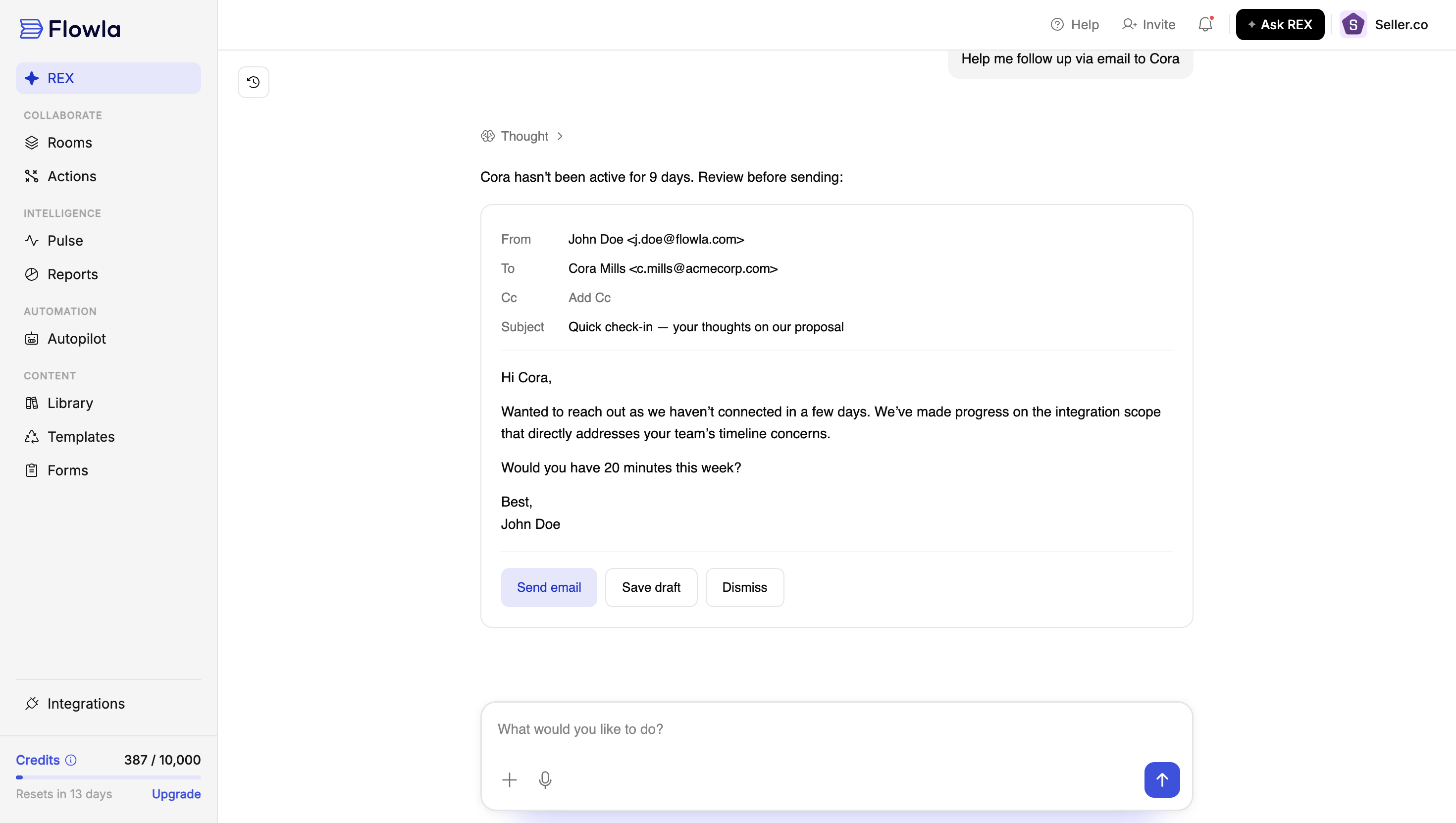
Draft and send emails, to explicit addresses, resolved contacts, or an existing email thread, and send [Slack](/integrations/Slack) messages. Both require your approval before sending.
Browse your organisation's or Flowla's [template library](/rooms/room-templates), trigger [Autopilot](/automations/automations-overview) workflows, and create [forms](/forms/forms-overview).
Look up public information about a company, person, or market via live web search. Approval is required before REX searches.
Search and recall REX's own past conversations with you, so you can pick up a thread from a previous chat.
### Updating your CRM
### Drafting and sending email
***
## What REX knows
* Everything inside your deal rooms: content, structure, and engagement or viewer activity
* Your connected CRM data (HubSpot, Salesforce, or Attio)
* [Signals](/rex/signals) automatically generated from meetings, CRM syncs, and room activity
* Your content library, including structured summaries of what each asset covers. See [Asset intelligence](/rex/asset-intelligence)
* Your org's users, templates, statuses, and labels
* Its own conversation history with you
* Live public web results, when it searches
* What room you're currently viewing, so it can ground its answer in context
***
## What REX can't or won't do
REX will not send an email, post to Slack, or search the web without your explicit approval first.
* It won't act on data it hasn't actually retrieved, so it won't invent contacts, numbers, or sources.
* It won't work without an available usage [credit](/plans-billing/credits) balance for your organisation.
 ***
## How different roles use this
Open REX from anywhere in the app. It's fastest when you open it from inside the deal room you're asking about, since it will already have that context loaded.
Good everyday uses:
* "Summarise where this deal stands and what's blocking it"
* "Draft a follow-up email to the champion after yesterday's call"
* "What CRM fields are out of date on this deal?"
* "Find me a one-pager about our security posture for a healthcare buyer, and add it to this room"
* "Set up a mutual action plan for this deal with the standard onboarding steps"
* "Update the HubSpot stage to Negotiation"
* "What can I do to unblock \[deal name]?" REX will connect a stakeholder's stated blocker to a specific asset, such as a roadmap doc showing a requested feature is already planned, and offer to add it to the room or send it directly.
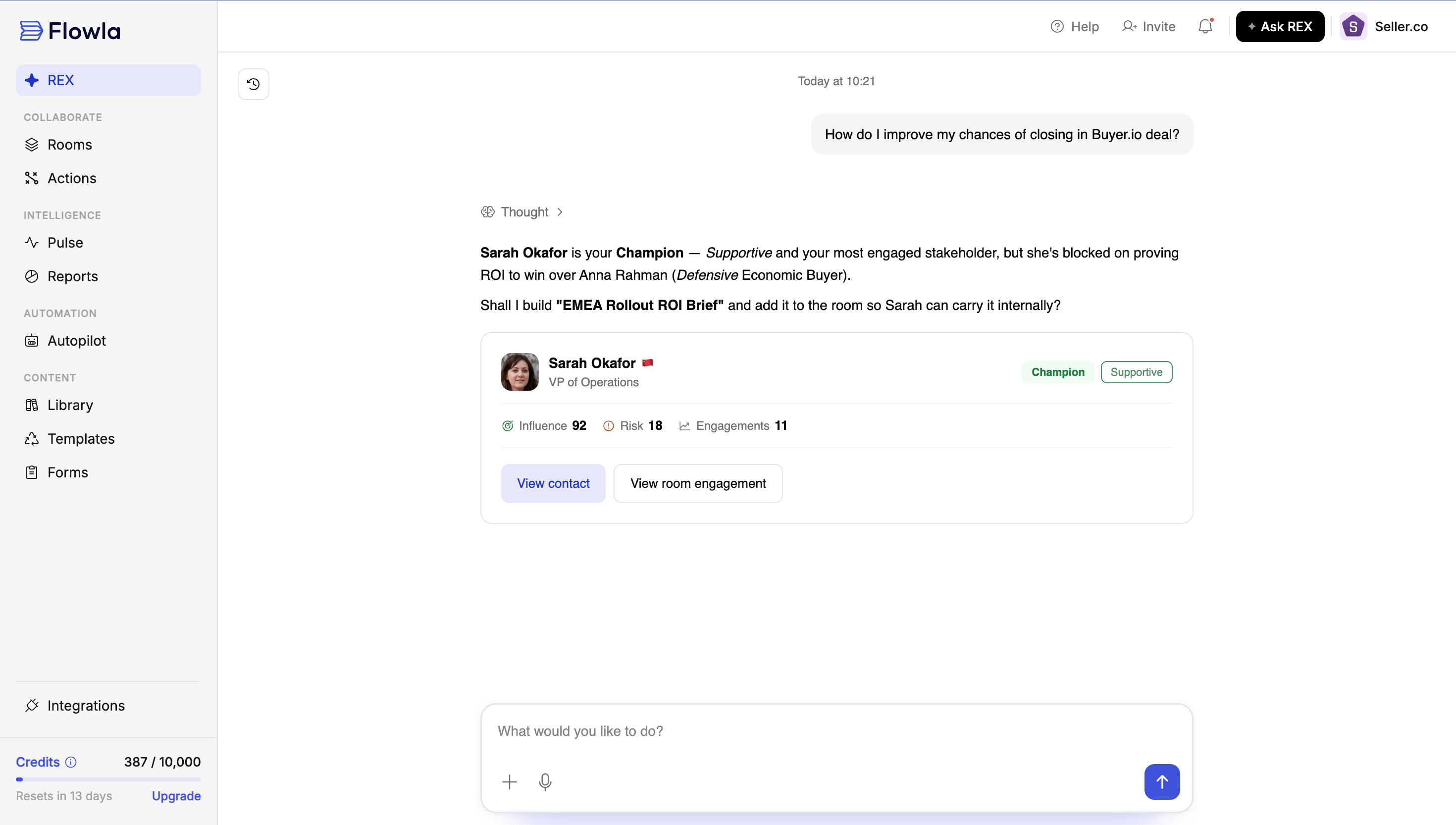
* "How do I improve my chances of closing \[deal name]?" REX will point to the specific stakeholder holding things up, say an economic buyer who's still defensive, and can offer to build a new asset tailored to what that person needs to see.
REX will show its work as it goes ("Looking up contacts for Acme Corp") and will always ask before sending anything on your behalf.
REX works the same way in an onboarding or account room. It already has that room's context loaded the moment you open it there.
* "Summarise where this onboarding stands and what's blocking go-live" pulls together room activity, CRM, and signals the same way it would for a sales deal.
* "Draft a check-in email to \[admin] about the stalled integration step" gets drafted grounded in what's actually happened in the room, and still asks for your approval before sending.
* "What's the engagement been like on this account this month?" is a fast way to check adoption without digging through analytics yourself.
* If REX seems to be missing context on an account, check the same things you would for a sales deal: is the CRM connected, and is a note-taker integration wired up for check-in calls?
REX is useful in 1:1s and pipeline reviews as a fast way to get an unbiased read on a deal before or during a conversation with a rep.
* Ask REX directly: "What's blocking \[deal name]?" or "Summarise the last two weeks of activity on \[deal name]" to prep for a review without digging through the room yourself.
* Use REX to spot CRM hygiene gaps across a rep's pipeline, such as missing fields or stale stages, and flag them before your next 1:1.
* REX's [recommended actions](/rex/signals) on a deal double as a coaching prompt. You can ask a rep why a recommended action wasn't taken.
### Finding the right stakeholder and the right asset
***
## How different roles use this
Open REX from anywhere in the app. It's fastest when you open it from inside the deal room you're asking about, since it will already have that context loaded.
Good everyday uses:
* "Summarise where this deal stands and what's blocking it"
* "Draft a follow-up email to the champion after yesterday's call"
* "What CRM fields are out of date on this deal?"
* "Find me a one-pager about our security posture for a healthcare buyer, and add it to this room"
* "Set up a mutual action plan for this deal with the standard onboarding steps"
* "Update the HubSpot stage to Negotiation"
* "What can I do to unblock \[deal name]?" REX will connect a stakeholder's stated blocker to a specific asset, such as a roadmap doc showing a requested feature is already planned, and offer to add it to the room or send it directly.
* "How do I improve my chances of closing \[deal name]?" REX will point to the specific stakeholder holding things up, say an economic buyer who's still defensive, and can offer to build a new asset tailored to what that person needs to see.
REX will show its work as it goes ("Looking up contacts for Acme Corp") and will always ask before sending anything on your behalf.
REX works the same way in an onboarding or account room. It already has that room's context loaded the moment you open it there.
* "Summarise where this onboarding stands and what's blocking go-live" pulls together room activity, CRM, and signals the same way it would for a sales deal.
* "Draft a check-in email to \[admin] about the stalled integration step" gets drafted grounded in what's actually happened in the room, and still asks for your approval before sending.
* "What's the engagement been like on this account this month?" is a fast way to check adoption without digging through analytics yourself.
* If REX seems to be missing context on an account, check the same things you would for a sales deal: is the CRM connected, and is a note-taker integration wired up for check-in calls?
REX is useful in 1:1s and pipeline reviews as a fast way to get an unbiased read on a deal before or during a conversation with a rep.
* Ask REX directly: "What's blocking \[deal name]?" or "Summarise the last two weeks of activity on \[deal name]" to prep for a review without digging through the room yourself.
* Use REX to spot CRM hygiene gaps across a rep's pipeline, such as missing fields or stale stages, and flag them before your next 1:1.
* REX's [recommended actions](/rex/signals) on a deal double as a coaching prompt. You can ask a rep why a recommended action wasn't taken.
### Finding the right stakeholder and the right asset
 ***
## FAQ
No. Sending email, sending Slack messages, and searching the public web all require you to explicitly approve the action first.
Not directly. Transcripts and other raw data are processed first, and REX reads the result. See the [Knowledge Graph](/rex/knowledge-graph).
HubSpot, Salesforce, and Attio are supported for reading and updating deal, contact, and company records.
Each REX turn has a bounded number of steps. If a request needs more work than that, REX will report what it's done so far and you can ask it to continue.
No. REX only answers using data it actually retrieved via a tool call. If it doesn't have the information, it will say so or ask you a clarifying question instead.
REX searches assets by their generated asset intelligence, not raw filenames. If that hasn't been generated for a given asset yet, it won't surface in search. See [Asset intelligence](/rex/asset-intelligence).
***
## FAQ
No. Sending email, sending Slack messages, and searching the public web all require you to explicitly approve the action first.
Not directly. Transcripts and other raw data are processed first, and REX reads the result. See the [Knowledge Graph](/rex/knowledge-graph).
HubSpot, Salesforce, and Attio are supported for reading and updating deal, contact, and company records.
Each REX turn has a bounded number of steps. If a request needs more work than that, REX will report what it's done so far and you can ask it to continue.
No. REX only answers using data it actually retrieved via a tool call. If it doesn't have the information, it will say so or ask you a clarifying question instead.
REX searches assets by their generated asset intelligence, not raw filenames. If that hasn't been generated for a given asset yet, it won't surface in search. See [Asset intelligence](/rex/asset-intelligence).