> ## Documentation Index
> Fetch the complete documentation index at: https://docs.flowla.com/llms.txt
> Use this file to discover all available pages before exploring further.
# Insight cards
> A four-part narrative summary of every deal: Motivation, Stance, Obstacle, and Trajectory, written from the same evidence that drives every other REX score.
On every deal room's Overview tab, under **REX's analysis**, REX surfaces two complementary views that summarise the deal at a glance and tell you what to do about it:
1. **Insight cards**, a grid of AI-written summaries covering the deal from four angles.
2. **REX's signals and next steps**, a running feed of specific, evidence-backed observations, each with a suggested next step.
Together these turn everything happening in a deal (calls, CRM changes, room engagement) into a short, actionable summary instead of something you have to piece together yourself.
This page covers insight cards. For the full detail on the feed, see [Signals & next best actions](/rex/signals).
***
## The four categories
Insight cards are generated from the room's [Knowledge Graph](/rex/knowledge-graph), the same picture that drives MEDDPICC and Deal Score, and organised into four fixed categories:
| Category | On the card | What it covers |
| -------------- | --------------------------------- | -------------------------------------------------------------- |
| **Motivation** | "What's driving the deal" | The buyer's problem, pain, or time pressure |
| **Stance** | "Where we stand" | Competitive comparison, and how the buyer perceives your value |
| **Obstacle** | "What's putting the deal at risk" | Concerns, blockers, unmet requirements |
| **Trajectory** | "Who decides and what's next" | The buying path and committed next steps |
Each card carries a status at a glance (**On track**, **Needs attention**, or **Neutral**) plus a short written analysis backed by the specific evidence that informed it.
***
## Opening a card
Clicking a card opens the **Deal insights** drawer, where you can move between all four categories. Each one shows:
* **Summary**, the written analysis with its status badge.
* **Signals**, the individual pieces of evidence behind it. Each is typed (pain point, urgency signal, commitment, and so on) and linked to the meeting it came from and the person who said it.
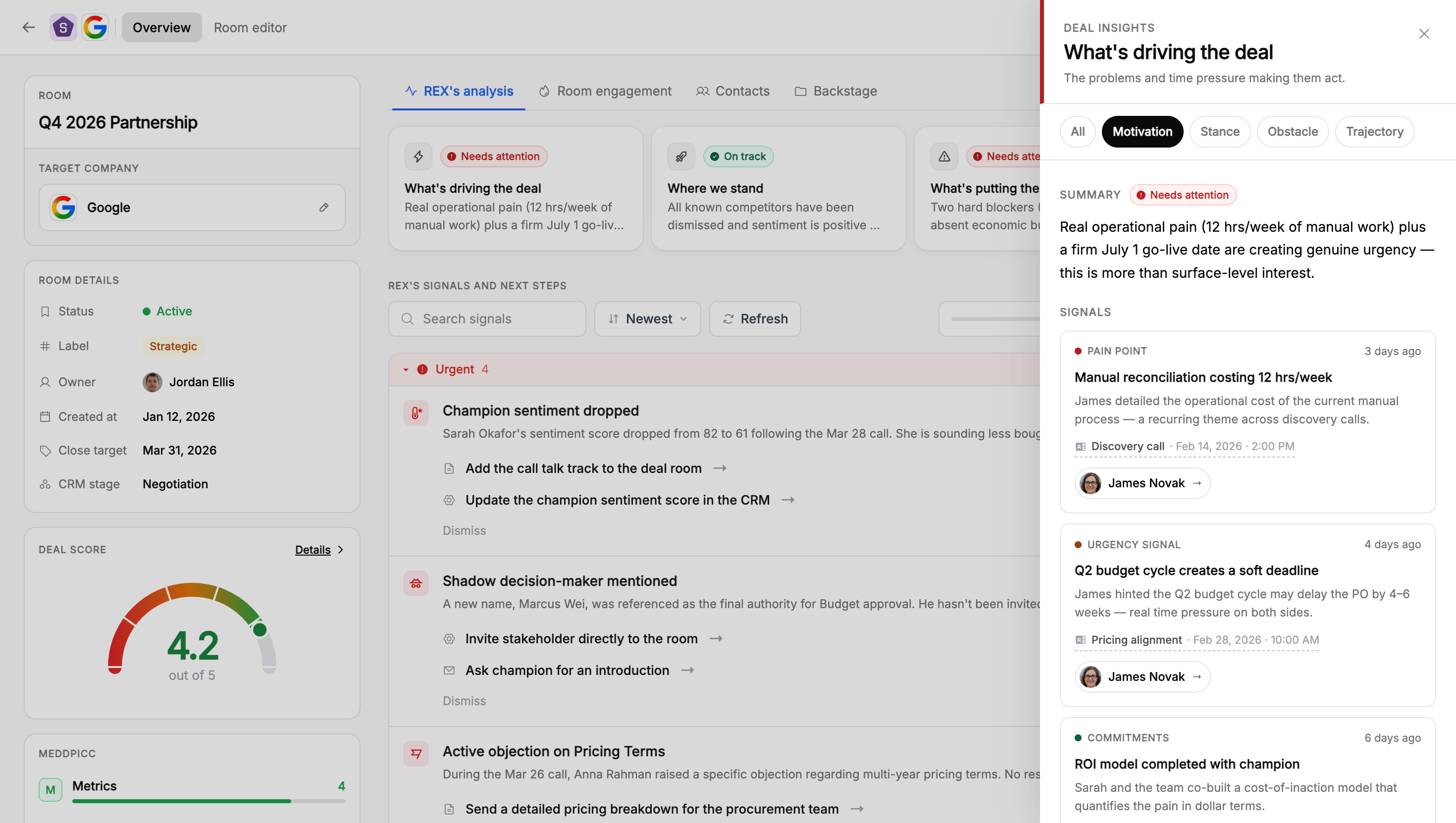
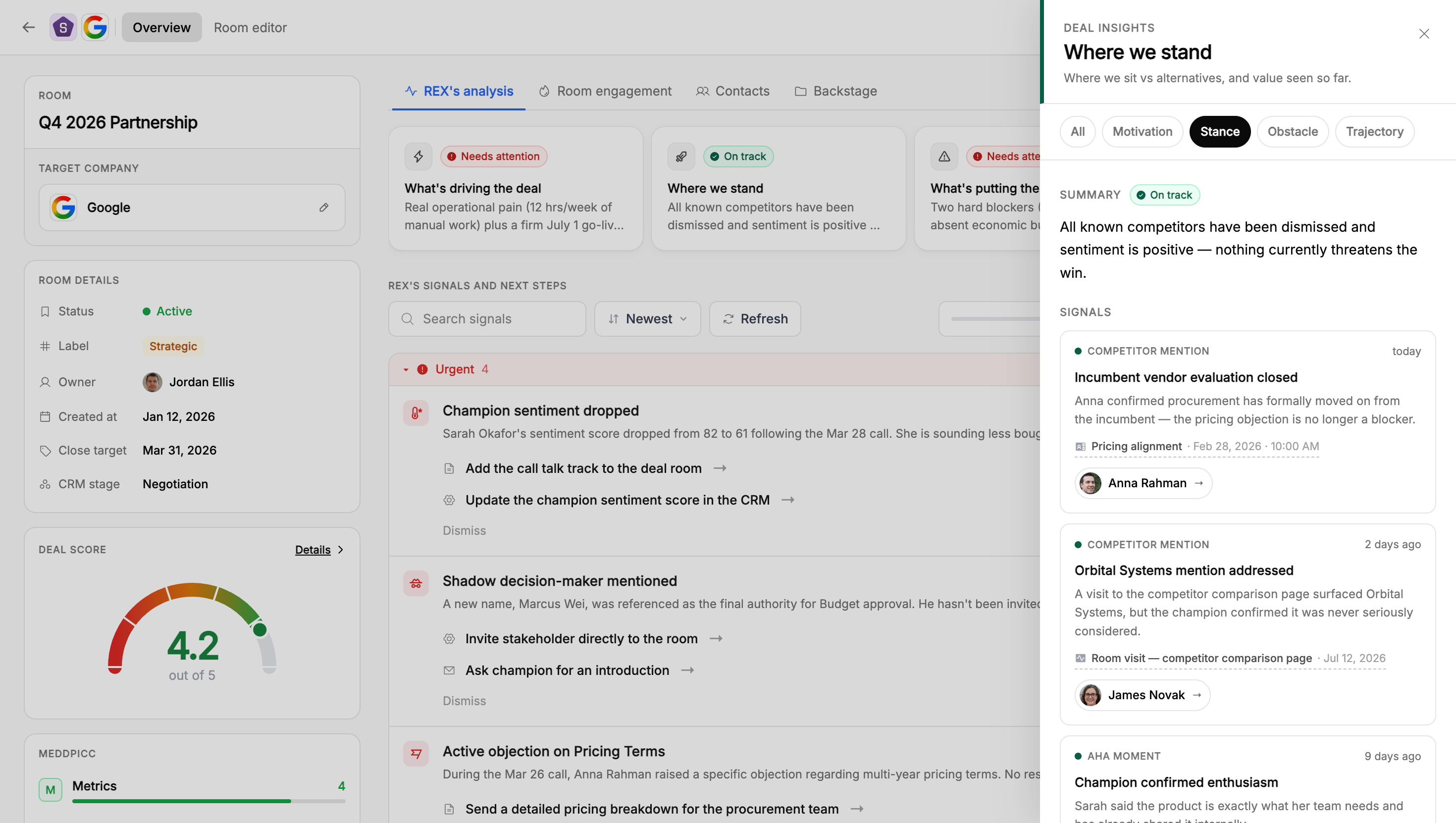
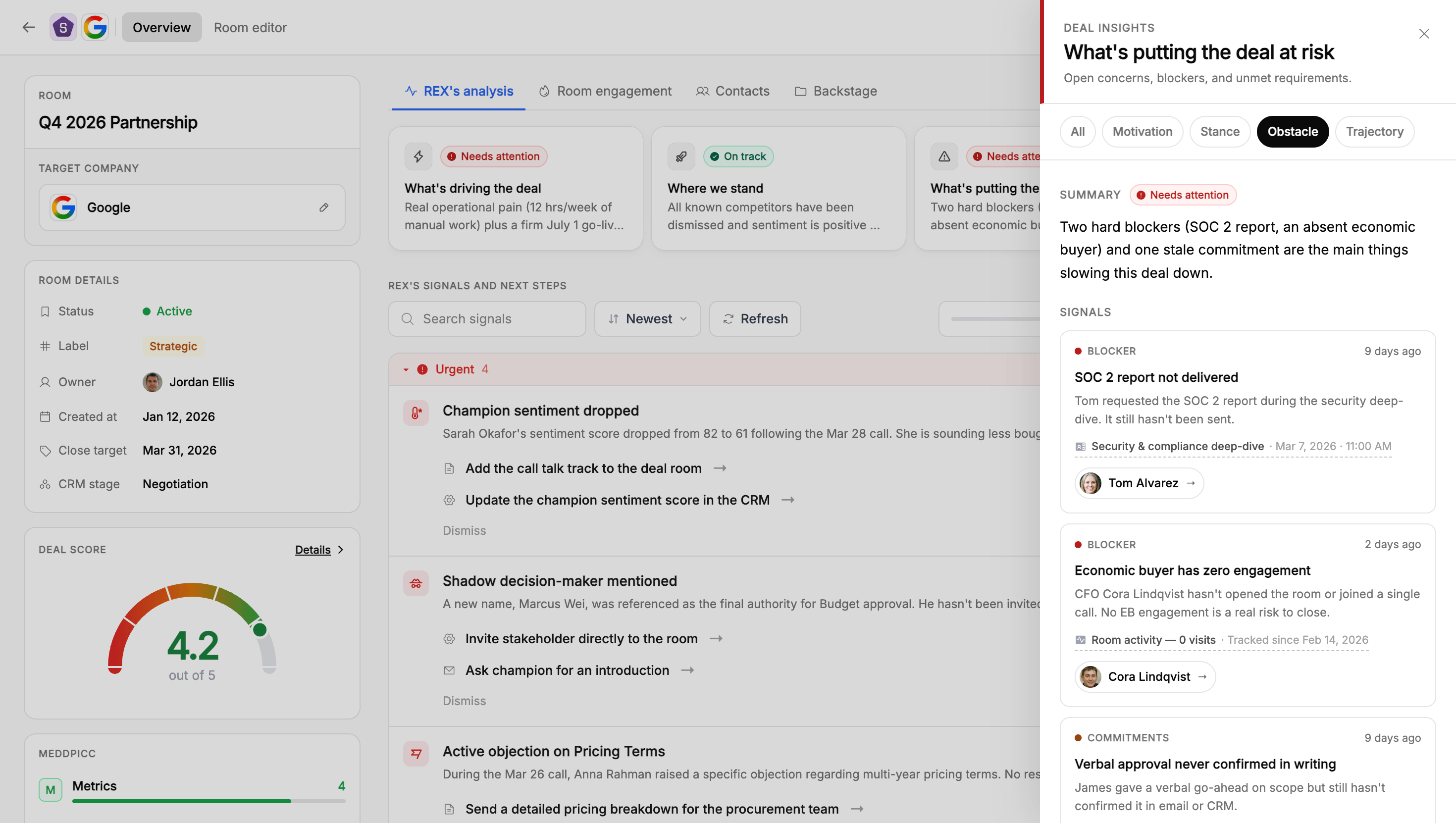
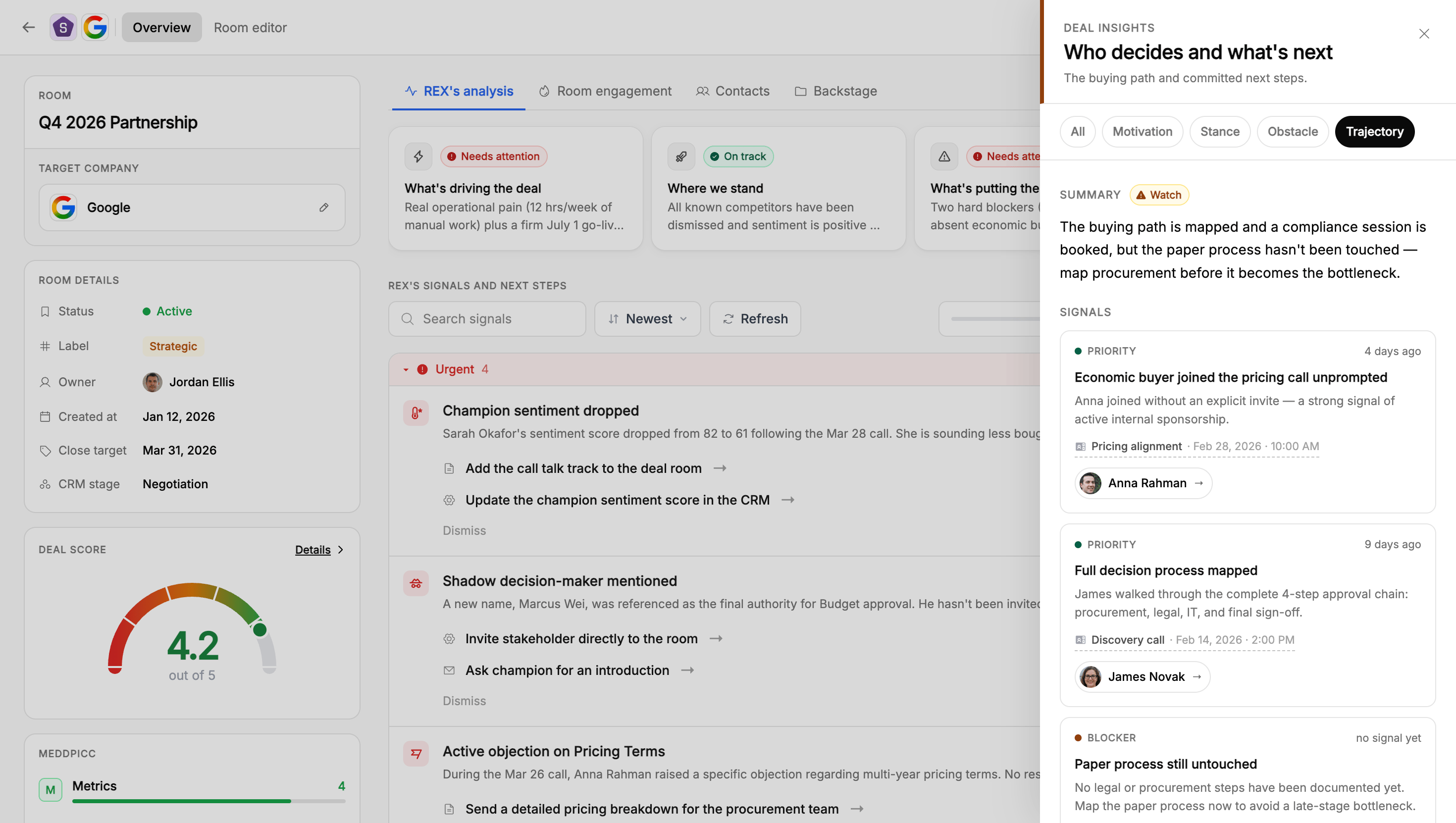 This is the same evidence-backed approach used throughout REX. Nothing in a card is asserted without a traceable source. See [where REX's data comes from](/rex/knowledge-graph#where-the-data-comes-from) for how that activity gets in.
***
## Insight cards versus signals
**REX's signals and next steps** is a separate, more granular feed of individual observations: a new risk, a buying signal, an unanswered question, a missing stakeholder. Each has a title, an urgency level, a justification, and one or more recommended actions.
See [Signals & next best actions](/rex/signals) for the full breakdown.
Read the cards for the narrative, work the feed for the to-do list. Motivation and Obstacle together are usually enough to prep talking points, and the feed tells you what to actually do next.
***
## How different roles use this
Start on the Overview tab before a call or a status update. The four insight cards give you a 30-second read on where the deal stands, and the signals feed tells you what to do next.
* Read Motivation and Obstacle together to prep talking points that address the buyer's real pain and objections.
* For working the feed itself, including prioritising signals, acting on recommendations, and dismissing what's not relevant, see [Signals & next best actions](/rex/signals).
The same Overview tab exists on any room you own, including an onboarding or account room.
* Motivation and Obstacle tell you why the customer bought and what's currently getting in the way of a smooth rollout, which is useful before a check-in call.
* Trajectory surfaces what's actually agreed to next for the rollout, so you're not relying on memory for what was promised on the last call.
* The signals feed is your onboarding to-do list the same way it's a rep's deal to-do list. A stalled setup step or a quiet admin shows up there without you having to notice it yourself.
* Use the Obstacle and Trajectory cards as a fast way to prep for a deal review without reading the whole room.
* For scanning signals across a portfolio of deals, see [Viewing signals across all rooms](/rex/signals#viewing-signals-across-all-rooms).
***
## FAQ
Insight cards are a four-part narrative summary of the deal. The signals feed is a list of specific, individually actionable observations with urgency levels and suggested next steps. See [Signals & next best actions](/rex/signals) for the full detail.
The same [Knowledge Graph](/rex/knowledge-graph) that powers MEDDPICC and Deal Score, built from meeting notes, CRM data, and deal room engagement.
No. The four categories are fixed and generated automatically from the Knowledge Graph.
This is the same evidence-backed approach used throughout REX. Nothing in a card is asserted without a traceable source. See [where REX's data comes from](/rex/knowledge-graph#where-the-data-comes-from) for how that activity gets in.
***
## Insight cards versus signals
**REX's signals and next steps** is a separate, more granular feed of individual observations: a new risk, a buying signal, an unanswered question, a missing stakeholder. Each has a title, an urgency level, a justification, and one or more recommended actions.
See [Signals & next best actions](/rex/signals) for the full breakdown.
Read the cards for the narrative, work the feed for the to-do list. Motivation and Obstacle together are usually enough to prep talking points, and the feed tells you what to actually do next.
***
## How different roles use this
Start on the Overview tab before a call or a status update. The four insight cards give you a 30-second read on where the deal stands, and the signals feed tells you what to do next.
* Read Motivation and Obstacle together to prep talking points that address the buyer's real pain and objections.
* For working the feed itself, including prioritising signals, acting on recommendations, and dismissing what's not relevant, see [Signals & next best actions](/rex/signals).
The same Overview tab exists on any room you own, including an onboarding or account room.
* Motivation and Obstacle tell you why the customer bought and what's currently getting in the way of a smooth rollout, which is useful before a check-in call.
* Trajectory surfaces what's actually agreed to next for the rollout, so you're not relying on memory for what was promised on the last call.
* The signals feed is your onboarding to-do list the same way it's a rep's deal to-do list. A stalled setup step or a quiet admin shows up there without you having to notice it yourself.
* Use the Obstacle and Trajectory cards as a fast way to prep for a deal review without reading the whole room.
* For scanning signals across a portfolio of deals, see [Viewing signals across all rooms](/rex/signals#viewing-signals-across-all-rooms).
***
## FAQ
Insight cards are a four-part narrative summary of the deal. The signals feed is a list of specific, individually actionable observations with urgency levels and suggested next steps. See [Signals & next best actions](/rex/signals) for the full detail.
The same [Knowledge Graph](/rex/knowledge-graph) that powers MEDDPICC and Deal Score, built from meeting notes, CRM data, and deal room engagement.
No. The four categories are fixed and generated automatically from the Knowledge Graph.