> ## Documentation Index
> Fetch the complete documentation index at: https://docs.flowla.com/llms.txt
> Use this file to discover all available pages before exploring further.
# Knowledge Graph
> The living picture behind every deal room: what REX learns from your calls, your CRM, and room activity, and how that data gets in.
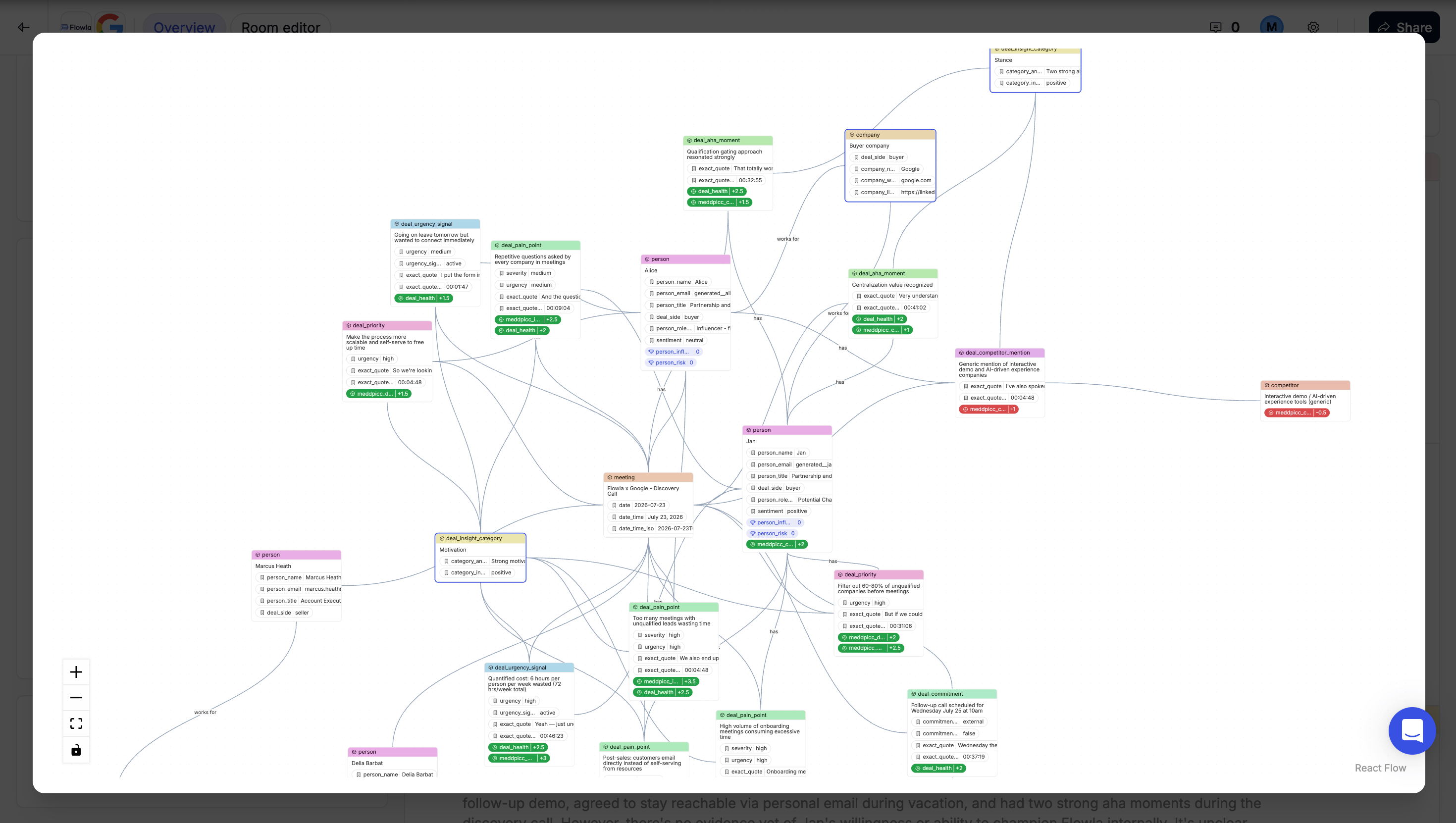
The Knowledge Graph is REX's living understanding of a deal. It holds what REX has learned about the contacts, the company, the competition, and the twists and turns of the sales process, built continuously from your calls, your CRM, and activity inside the room.
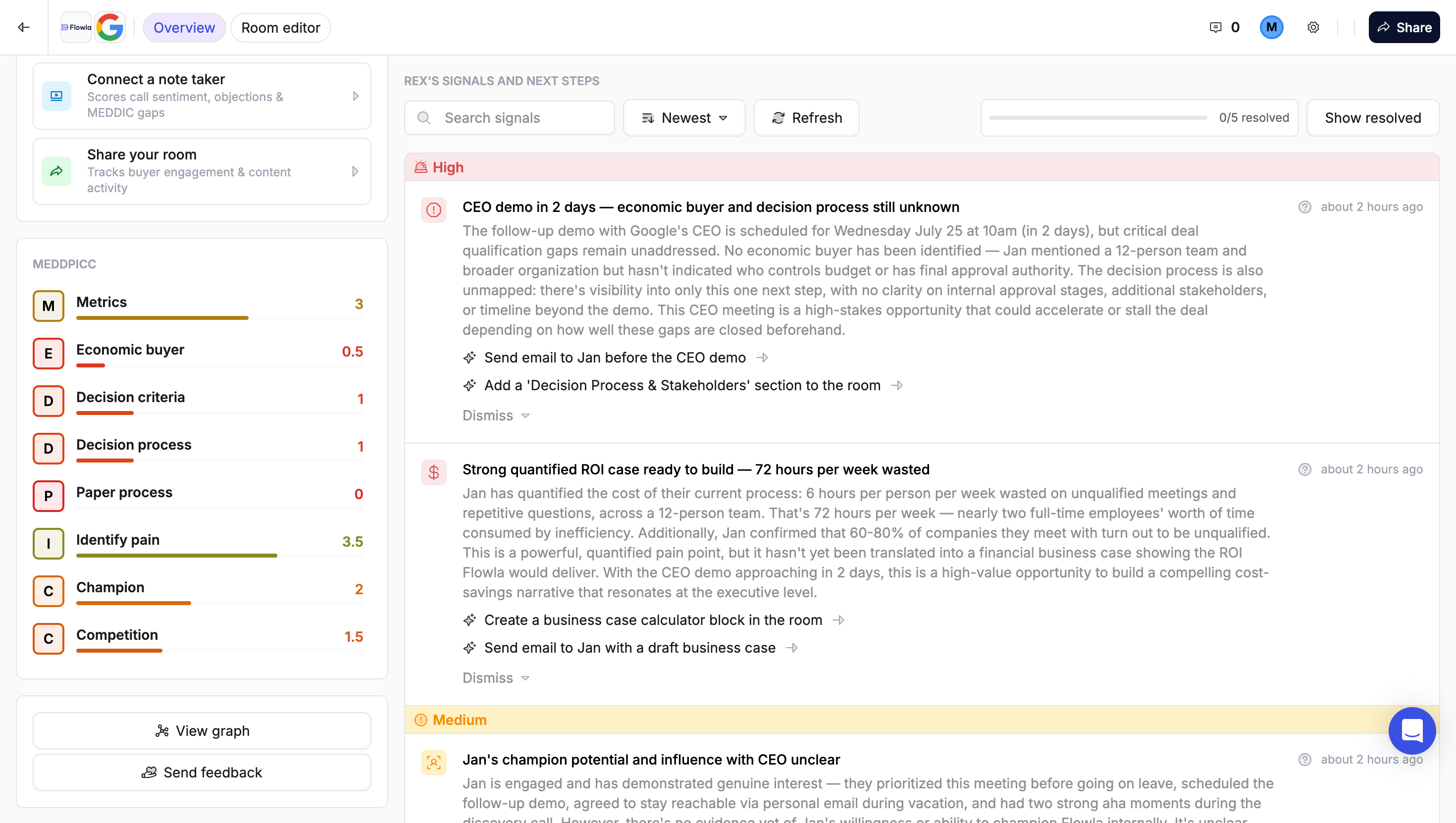
It isn't really a feature you use on its own. It's the picture underneath the room that every other REX feature reads from. [Deal Score](/rex/deal-score), [MEDDPICC](/rex/meddpicc), [insight cards](/rex/insight-cards), and [signals](/rex/signals) are all different views onto this same picture, which is why they never contradict each other.
To see it directly rather than through a processed view, click **View graph** below the MEDDPICC card in the room sidebar.
 ***
## A transcript versus a memory
Think of it as the difference between a transcript and a memory. A transcript is a wall of text from one call. The Knowledge Graph is what's left after REX has read every call, every CRM update, and every bit of room activity for a deal, and organised it into a structured picture: who's who, what they care about, what's worrying them, what they've promised, and how all of that is trending.
That picture doesn't go dark between calls. Deals move (or stall) in the days in between, while a buyer is quietly rereading the pricing section, forwarding a page to a colleague who's never joined a call, or opening the room every morning for a week without saying a word to you. Room engagement is as much a part of the graph as anything said out loud, and it's often the only signal you get during the silence between meetings.
***
## What it knows about a deal
REX keeps track of who's involved on the buying side, which company each person belongs to, and how they relate to each other and to the deal. That's what lets it reason about things like "the champion doesn't have a direct line to the economic buyer" instead of just listing people in isolation.
Around those people, it holds what they've told you: the problems they're trying to solve, the worries they have about you, the questions nobody answered, what they've promised and whether it happened, and which competitors are in play. Everything REX concludes stays connected to the moment it came from, which is why you can click into any score or signal and see the actual words, from the actual person, in the actual meeting.
### Room engagement
Alongside what's said in meetings, REX tracks what happens inside the deal room itself: who's visited, what they opened, how recently, and how often they've been coming back.
This isn't a side metric. It's the only window you get into what a buyer is doing when you're not on a call with them:
* A contact rereading the pricing section three times in a week
* A stakeholder who's never joined a meeting but has quietly opened the room five times
* A room that's gone completely unopened for two weeks despite a "we're aligned, let's move forward" on the last call
All of that is real signal, and often the earliest warning of either momentum or risk. It's also what lets REX distinguish a person who's genuinely engaged from one who was added as a contact but has never looked at anything.
The same engagement data is available as a dashboard in [Room analytics](/reports-analytics/room-analytics). The difference is that REX reasons about it alongside your meeting and CRM data rather than only reporting it.
### Mutual action plans
A deal room's [action plan](/mutual-action-plans/actions-overview) is part of the picture too, not a separate to-do list REX ignores. REX knows what's on the plan, who owns each item, and what's overdue right now.
That turns the action plan into something REX actively reasons about. An item assigned to the buyer that's now a week overdue is a real, negative signal, not a passive checklist entry nobody's watching.
***
## Where the data comes from
The graph only knows what it's been given. There are three inputs: your meetings, your CRM, and activity inside the room.
### Meeting sync
Flowla connects to your call-recording tools at two different levels.
| Level | Tools | How calls arrive |
| -------------- | ----------------------- | ------------------------------------------------------------------------------------------------------------ |
| **Auto-sync** | Fireflies, Gong, Fathom | Every new call syncs automatically the moment it ends. Once connected, there's nothing to do per meeting. |
| **Manual add** | Avoma, Granola | Connected the same way, but calls come in one at a time. You add a specific call when you want it processed. |
***
## A transcript versus a memory
Think of it as the difference between a transcript and a memory. A transcript is a wall of text from one call. The Knowledge Graph is what's left after REX has read every call, every CRM update, and every bit of room activity for a deal, and organised it into a structured picture: who's who, what they care about, what's worrying them, what they've promised, and how all of that is trending.
That picture doesn't go dark between calls. Deals move (or stall) in the days in between, while a buyer is quietly rereading the pricing section, forwarding a page to a colleague who's never joined a call, or opening the room every morning for a week without saying a word to you. Room engagement is as much a part of the graph as anything said out loud, and it's often the only signal you get during the silence between meetings.
***
## What it knows about a deal
REX keeps track of who's involved on the buying side, which company each person belongs to, and how they relate to each other and to the deal. That's what lets it reason about things like "the champion doesn't have a direct line to the economic buyer" instead of just listing people in isolation.
Around those people, it holds what they've told you: the problems they're trying to solve, the worries they have about you, the questions nobody answered, what they've promised and whether it happened, and which competitors are in play. Everything REX concludes stays connected to the moment it came from, which is why you can click into any score or signal and see the actual words, from the actual person, in the actual meeting.
### Room engagement
Alongside what's said in meetings, REX tracks what happens inside the deal room itself: who's visited, what they opened, how recently, and how often they've been coming back.
This isn't a side metric. It's the only window you get into what a buyer is doing when you're not on a call with them:
* A contact rereading the pricing section three times in a week
* A stakeholder who's never joined a meeting but has quietly opened the room five times
* A room that's gone completely unopened for two weeks despite a "we're aligned, let's move forward" on the last call
All of that is real signal, and often the earliest warning of either momentum or risk. It's also what lets REX distinguish a person who's genuinely engaged from one who was added as a contact but has never looked at anything.
The same engagement data is available as a dashboard in [Room analytics](/reports-analytics/room-analytics). The difference is that REX reasons about it alongside your meeting and CRM data rather than only reporting it.
### Mutual action plans
A deal room's [action plan](/mutual-action-plans/actions-overview) is part of the picture too, not a separate to-do list REX ignores. REX knows what's on the plan, who owns each item, and what's overdue right now.
That turns the action plan into something REX actively reasons about. An item assigned to the buyer that's now a week overdue is a real, negative signal, not a passive checklist entry nobody's watching.
***
## Where the data comes from
The graph only knows what it's been given. There are three inputs: your meetings, your CRM, and activity inside the room.
### Meeting sync
Flowla connects to your call-recording tools at two different levels.
| Level | Tools | How calls arrive |
| -------------- | ----------------------- | ------------------------------------------------------------------------------------------------------------ |
| **Auto-sync** | Fireflies, Gong, Fathom | Every new call syncs automatically the moment it ends. Once connected, there's nothing to do per meeting. |
| **Manual add** | Avoma, Granola | Connected the same way, but calls come in one at a time. You add a specific call when you want it processed. |


 An auto-synced call is matched to the right room and processed on its own, usually within minutes of the recording finishing. There's no manual step once the note-taker is connected, and everything downstream (Deal Score, MEDDPICC, insight cards, and signals) updates with it.
### CRM sync
Once you connect a CRM and choose which fields matter, Flowla keeps those fields in sync automatically. REX always reflects current CRM state without anyone re-pulling it.
An auto-synced call is matched to the right room and processed on its own, usually within minutes of the recording finishing. There's no manual step once the note-taker is connected, and everything downstream (Deal Score, MEDDPICC, insight cards, and signals) updates with it.
### CRM sync
Once you connect a CRM and choose which fields matter, Flowla keeps those fields in sync automatically. REX always reflects current CRM state without anyone re-pulling it.


 ### Room activity
Engagement inside the room feeds in continuously, so REX's read on a deal keeps moving even when there hasn't been a call.
***
## Built on evidence
Not everything REX knows is a judgment call:
* **Hard facts** like deal amount, close date, CRM field values, and a meeting's date and time are captured as-is.
* **Everything else**, including how severe a concern is, how urgent a blocker feels, and a person's current sentiment, is an AI assessment graded from the evidence rather than asserted as fact.
Every assessment comes with its own plain-language justification, which is why clicking into a score never just shows you a number. It shows you the specific evidence, attributable to a specific person and moment, that produced it. That's also what lets REX be confident about a close date and appropriately hedged about how a person feels.
***
## What it feeds
| Feature | What it reads from the Knowledge Graph |
| ----------------------------------------------------------- | ------------------------------------------------------------------------------------------- |
| [Deal Score](/rex/deal-score) | The aggregate health number |
| [MEDDPICC](/rex/meddpicc) | The eight-dimension qualification breakdown |
| [Mutual action plan](/mutual-action-plans/actions-overview) | REX can propose new items, update existing ones, or flag overdue ones from what's discussed |
| [Insight cards](/rex/insight-cards) | The four-part Motivation, Stance, Obstacle, Trajectory narrative |
| [Signals](/rex/signals) | The individual, actionable observations feed |
***
## Making it richer
The biggest levers for a more accurate picture:
[HubSpot](/integrations/HubSpot), [Salesforce](/integrations/SalesForce), or [Attio](/integrations/Attio).
The fastest way to keep the graph current, since it removes the manual step per meeting.
A single-threaded deal will always look thinner than a well multi-threaded one.
So there's engagement to observe in the first place.
A deal with one contact, no connected CRM, and a room nobody's opened will have a thin graph and, correspondingly, thin scores and signals. That's expected, not a bug.
***
## How different roles use this
You'll rarely think about "the graph" directly. You'll experience it as Deal Score, MEDDPICC, and signals all agreeing with each other, because they're reading the same picture.
* Every observation is clickable back to its source. Use that to sanity-check REX's read before a call, or to get the receipts for a forecast conversation.
* Check room engagement before a call, not just your notes. Knowing that the economic buyer opened the room for the first time yesterday, or that nobody's looked at it in two weeks, tells you something a transcript never will.
* The action plan is a live part of this picture, not paperwork. An overdue item assigned to the buyer is a real warning sign.
The same picture builds itself around an onboarding or account room just as much as a sales one.
* A brand-new onboarding room will look sparse at first for the same reason a new sales room does. There isn't enough history yet, so it isn't a data problem to troubleshoot.
* Room engagement is often your best signal during a rollout. An admin who hasn't opened the room in two weeks tells you more about real adoption than a check-in call will.
* Commitments carry over post-sale too. If you promised an integration or training session by a date, an overdue one is a real risk signal for the account.
* When a rep says "trust me, it's fine," you can ask to see the evidence. Every score and signal traces back to an actual quote, from an actual person, in an actual meeting.
* A thin graph usually means the account isn't multi-threaded yet, independent of what the rep is telling you.
* What people promised and whether they followed through is tracked over time, so "did they actually do what they said" is a fact you can check rather than something you have to remember.
* A deal reported as healthy with a room nobody's opened in weeks is worth a direct question before it hits the forecast.
***
## FAQ
Mostly you experience it through Deal Score, MEDDPICC, insight cards, and signals, all of which let you click through to the underlying evidence. You can also open the graph itself by clicking **View graph** below the MEDDPICC card in the room sidebar.
No. Hard data like deal amount, dates, and CRM field values is captured as-is. Everything else (severity, urgency, sentiment) is an AI judgment, graded from the evidence and always shown with its justification.
There isn't yet enough meeting, CRM, or room activity to build a picture from. This resolves naturally as calls happen and the CRM syncs. Connecting a note-taker is the fastest way to accelerate it.
Fireflies, Gong, and Fathom sync automatically. Avoma and Granola are supported via manual add, where you pull in a specific call when you want it processed.
No, but it's the fastest way to keep the graph rich and current. Without one you can still add transcripts manually, but that requires a manual step per meeting.
Connected CRM fields sync automatically in the background on an ongoing basis. You shouldn't need to manually re-sync.
### Room activity
Engagement inside the room feeds in continuously, so REX's read on a deal keeps moving even when there hasn't been a call.
***
## Built on evidence
Not everything REX knows is a judgment call:
* **Hard facts** like deal amount, close date, CRM field values, and a meeting's date and time are captured as-is.
* **Everything else**, including how severe a concern is, how urgent a blocker feels, and a person's current sentiment, is an AI assessment graded from the evidence rather than asserted as fact.
Every assessment comes with its own plain-language justification, which is why clicking into a score never just shows you a number. It shows you the specific evidence, attributable to a specific person and moment, that produced it. That's also what lets REX be confident about a close date and appropriately hedged about how a person feels.
***
## What it feeds
| Feature | What it reads from the Knowledge Graph |
| ----------------------------------------------------------- | ------------------------------------------------------------------------------------------- |
| [Deal Score](/rex/deal-score) | The aggregate health number |
| [MEDDPICC](/rex/meddpicc) | The eight-dimension qualification breakdown |
| [Mutual action plan](/mutual-action-plans/actions-overview) | REX can propose new items, update existing ones, or flag overdue ones from what's discussed |
| [Insight cards](/rex/insight-cards) | The four-part Motivation, Stance, Obstacle, Trajectory narrative |
| [Signals](/rex/signals) | The individual, actionable observations feed |
***
## Making it richer
The biggest levers for a more accurate picture:
[HubSpot](/integrations/HubSpot), [Salesforce](/integrations/SalesForce), or [Attio](/integrations/Attio).
The fastest way to keep the graph current, since it removes the manual step per meeting.
A single-threaded deal will always look thinner than a well multi-threaded one.
So there's engagement to observe in the first place.
A deal with one contact, no connected CRM, and a room nobody's opened will have a thin graph and, correspondingly, thin scores and signals. That's expected, not a bug.
***
## How different roles use this
You'll rarely think about "the graph" directly. You'll experience it as Deal Score, MEDDPICC, and signals all agreeing with each other, because they're reading the same picture.
* Every observation is clickable back to its source. Use that to sanity-check REX's read before a call, or to get the receipts for a forecast conversation.
* Check room engagement before a call, not just your notes. Knowing that the economic buyer opened the room for the first time yesterday, or that nobody's looked at it in two weeks, tells you something a transcript never will.
* The action plan is a live part of this picture, not paperwork. An overdue item assigned to the buyer is a real warning sign.
The same picture builds itself around an onboarding or account room just as much as a sales one.
* A brand-new onboarding room will look sparse at first for the same reason a new sales room does. There isn't enough history yet, so it isn't a data problem to troubleshoot.
* Room engagement is often your best signal during a rollout. An admin who hasn't opened the room in two weeks tells you more about real adoption than a check-in call will.
* Commitments carry over post-sale too. If you promised an integration or training session by a date, an overdue one is a real risk signal for the account.
* When a rep says "trust me, it's fine," you can ask to see the evidence. Every score and signal traces back to an actual quote, from an actual person, in an actual meeting.
* A thin graph usually means the account isn't multi-threaded yet, independent of what the rep is telling you.
* What people promised and whether they followed through is tracked over time, so "did they actually do what they said" is a fact you can check rather than something you have to remember.
* A deal reported as healthy with a room nobody's opened in weeks is worth a direct question before it hits the forecast.
***
## FAQ
Mostly you experience it through Deal Score, MEDDPICC, insight cards, and signals, all of which let you click through to the underlying evidence. You can also open the graph itself by clicking **View graph** below the MEDDPICC card in the room sidebar.
No. Hard data like deal amount, dates, and CRM field values is captured as-is. Everything else (severity, urgency, sentiment) is an AI judgment, graded from the evidence and always shown with its justification.
There isn't yet enough meeting, CRM, or room activity to build a picture from. This resolves naturally as calls happen and the CRM syncs. Connecting a note-taker is the fastest way to accelerate it.
Fireflies, Gong, and Fathom sync automatically. Avoma and Granola are supported via manual add, where you pull in a specific call when you want it processed.
No, but it's the fastest way to keep the graph rich and current. Without one you can still add transcripts manually, but that requires a manual step per meeting.
Connected CRM fields sync automatically in the background on an ongoing basis. You shouldn't need to manually re-sync.