> ## Documentation Index
> Fetch the complete documentation index at: https://docs.flowla.com/llms.txt
> Use this file to discover all available pages before exploring further.
# What is REX
> REX is Flowla's AI Revenue Execution Agent. It reads every meeting, CRM update, and room interaction, and turns it into scores, signals, and an assistant that can act on your behalf.
REX reads every meeting, CRM update, and deal room interaction, turns that into a continuously-updated picture of each deal, and surfaces that picture as scores, signals, and a chat assistant that can take action for you.
Everything below is one system: different views onto the same underlying evidence, which is why they never contradict each other.
 ***
## Start with the Knowledge Graph
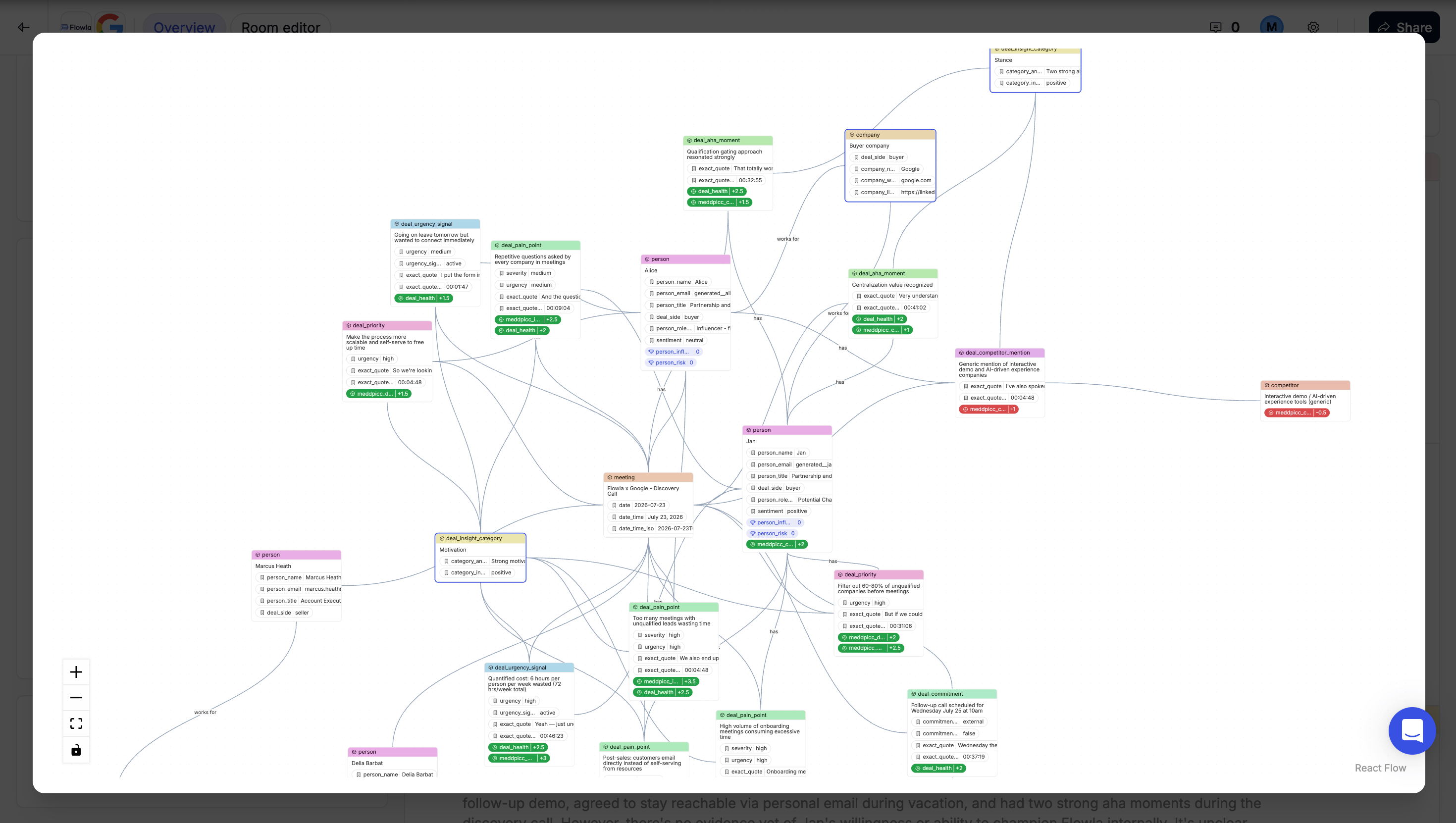
The [**Knowledge Graph**](/rex/knowledge-graph) is the living picture behind every deal room, built from calls, CRM data, and room engagement.
It isn't a feature you use directly. It's the foundation every other REX feature reads from, and it's also where you'll find how meetings, CRM records, and room activity actually get in. Start there if you want to understand *how* REX knows what it knows.
***
## What REX shows you
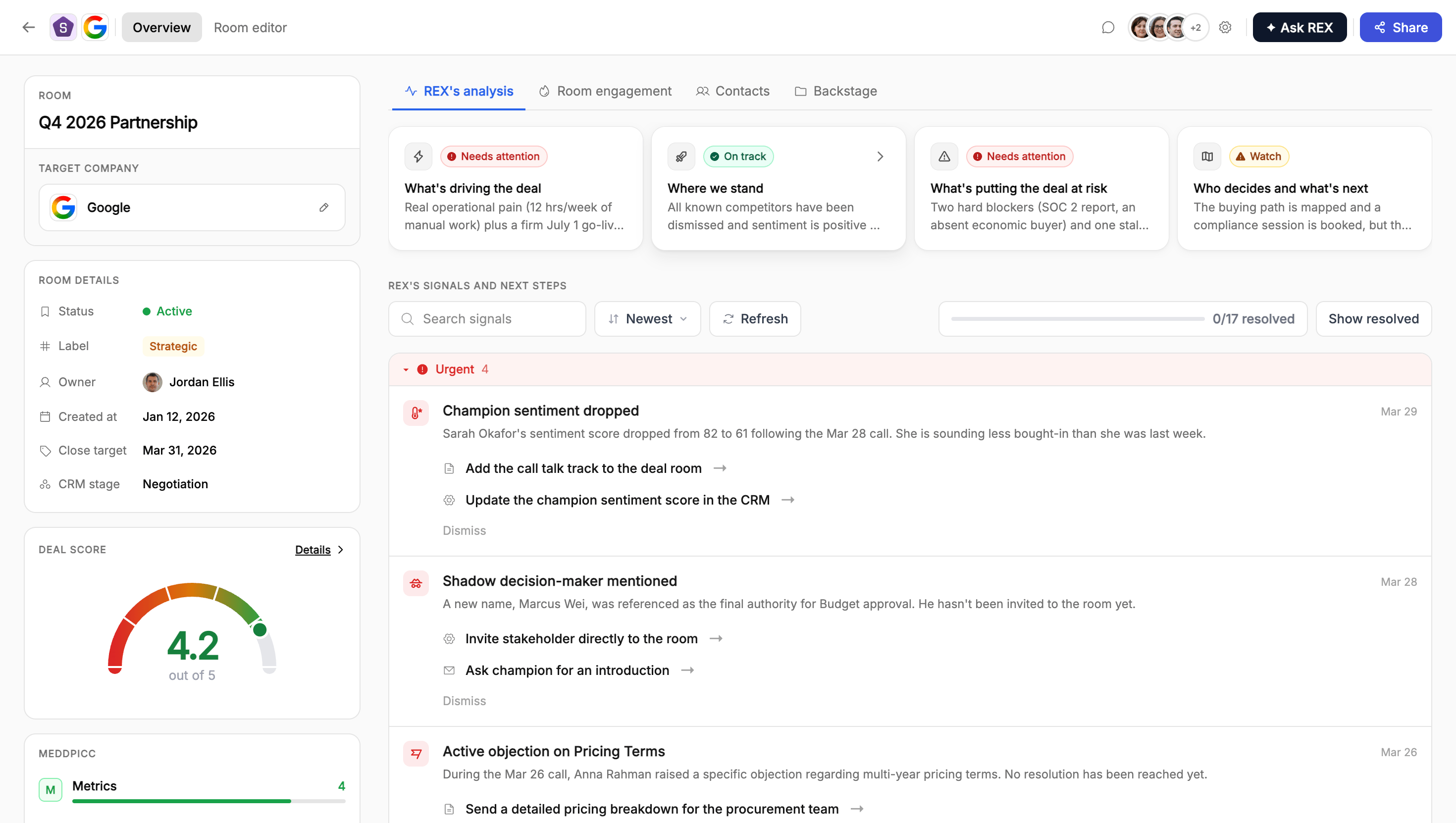
The most actionable surface is the signals feed, which is where REX tells you what to actually do next.
A worklist of specific, dated observations, each with a concrete next step REX can start executing for you. Available per room, or as one queue across your whole pipeline.
Alongside it, three views score and summarise the deal at different altitudes.
"How healthy is this deal, overall?" One number from 0 to 5, shown as the Dealmeter gauge.
"Which part of the deal is weak?" The same evidence, broken into eight qualification dimensions.
A four-part narrative: Motivation, Stance, Obstacle, Trajectory. The 30-second read on a deal.
***
## The assistant
The conversational agent, in a drawer or as a full page. Creates and edits rooms, manages action plans, updates your CRM, drafts emails, and searches the web, always asking approval before anything external-facing goes out.
How your content library gets analysed into structured, searchable profiles covering persona, stage, competitors, and freshness, so REX recommends the right asset rather than a keyword match.
***
## Get the most out of REX
REX is only as sharp as the data it has. A "Not scored yet" gauge or a thin MEDDPICC card almost always means the same thing: no note-taker connected and no CRM synced, so REX has nothing to build from yet. The fix is to connect one, not to assume something's broken.
[HubSpot](/integrations/HubSpot), [Salesforce](/integrations/SalesForce), or [Attio](/integrations/Attio). Connected fields sync in the background, so REX always reflects current CRM state.
Fireflies, Gong, and Fathom sync every call automatically. Avoma and Granola work via manual add. See [where REX's data comes from](/rex/knowledge-graph#where-the-data-comes-from).
Room engagement, meaning who's visiting and what they're reading, is one of REX's richest signal sources and often the only one available between calls.
In Library settings, so your content is searchable and recommendable by REX from day one. See [Asset intelligence](/rex/asset-intelligence).
***
## Suggested reading order
[The foundation](/rex/knowledge-graph): what REX knows about a deal, and where the data comes from.
[The worklist](/rex/signals): what REX noticed, and what it suggests you do about it.
[Deal Score](/rex/deal-score), then [MEDDPICC](/rex/meddpicc) and [insight cards](/rex/insight-cards).
[REX Chat](/rex/chat) and [Asset intelligence](/rex/asset-intelligence): what REX can do and what it can pull from.
***
## Built on evidence, not black-box AI
Every score, signal, and contact detail traces back to a specific quote from a specific meeting, a CRM field, or a room visit, so you can always see the *why* behind a number rather than just the number.
Hard facts like deal amount, close date, and CRM values are captured as-is. Soft judgments like severity, urgency, and sentiment are AI-graded and always shown with their justification, never asserted as bare fact.
***
## Start with the Knowledge Graph
The [**Knowledge Graph**](/rex/knowledge-graph) is the living picture behind every deal room, built from calls, CRM data, and room engagement.
It isn't a feature you use directly. It's the foundation every other REX feature reads from, and it's also where you'll find how meetings, CRM records, and room activity actually get in. Start there if you want to understand *how* REX knows what it knows.
***
## What REX shows you
The most actionable surface is the signals feed, which is where REX tells you what to actually do next.
A worklist of specific, dated observations, each with a concrete next step REX can start executing for you. Available per room, or as one queue across your whole pipeline.
Alongside it, three views score and summarise the deal at different altitudes.
"How healthy is this deal, overall?" One number from 0 to 5, shown as the Dealmeter gauge.
"Which part of the deal is weak?" The same evidence, broken into eight qualification dimensions.
A four-part narrative: Motivation, Stance, Obstacle, Trajectory. The 30-second read on a deal.
***
## The assistant
The conversational agent, in a drawer or as a full page. Creates and edits rooms, manages action plans, updates your CRM, drafts emails, and searches the web, always asking approval before anything external-facing goes out.
How your content library gets analysed into structured, searchable profiles covering persona, stage, competitors, and freshness, so REX recommends the right asset rather than a keyword match.
***
## Get the most out of REX
REX is only as sharp as the data it has. A "Not scored yet" gauge or a thin MEDDPICC card almost always means the same thing: no note-taker connected and no CRM synced, so REX has nothing to build from yet. The fix is to connect one, not to assume something's broken.
[HubSpot](/integrations/HubSpot), [Salesforce](/integrations/SalesForce), or [Attio](/integrations/Attio). Connected fields sync in the background, so REX always reflects current CRM state.
Fireflies, Gong, and Fathom sync every call automatically. Avoma and Granola work via manual add. See [where REX's data comes from](/rex/knowledge-graph#where-the-data-comes-from).
Room engagement, meaning who's visiting and what they're reading, is one of REX's richest signal sources and often the only one available between calls.
In Library settings, so your content is searchable and recommendable by REX from day one. See [Asset intelligence](/rex/asset-intelligence).
***
## Suggested reading order
[The foundation](/rex/knowledge-graph): what REX knows about a deal, and where the data comes from.
[The worklist](/rex/signals): what REX noticed, and what it suggests you do about it.
[Deal Score](/rex/deal-score), then [MEDDPICC](/rex/meddpicc) and [insight cards](/rex/insight-cards).
[REX Chat](/rex/chat) and [Asset intelligence](/rex/asset-intelligence): what REX can do and what it can pull from.
***
## Built on evidence, not black-box AI
Every score, signal, and contact detail traces back to a specific quote from a specific meeting, a CRM field, or a room visit, so you can always see the *why* behind a number rather than just the number.
Hard facts like deal amount, close date, and CRM values are captured as-is. Soft judgments like severity, urgency, and sentiment are AI-graded and always shown with their justification, never asserted as bare fact.