> ## Documentation Index
> Fetch the complete documentation index at: https://docs.flowla.com/llms.txt
> Use this file to discover all available pages before exploring further.
# Embed code
> Render an HTML snippet or mini-app directly inside your room, written by you or built by REX.
The **Embed code** block brings custom, interactive content into your room, so visitors don't have to leave it. Use it for anything you can express as HTML: a calculator, an interactive diagram, a pricing configurator, or a widget from another tool.
***
## Embed code or Link preview?
The **Embed** option in the block menu offers two choices:
| Option | Use it when |
| - | - |
| **Link preview** | You have a URL and want to embed that webpage as a live preview |
| **Embed code** | You have HTML, or want REX to build something for you |
***
## Add an Embed code block
In the room editor, click **Add block** on the page.
Select **Embed**, then **Embed code**.
Fill the block in one of three ways:
* **Write or paste** your HTML in the **Code** tab.
* Click **Upload HTML** to use an HTML file.
* Click **Create with REX** and describe what you want. [REX](/rex/chat) builds it and shows you the result for review.
Switch to the **Preview** tab to check the result, then adjust the sizing so it fits your room.
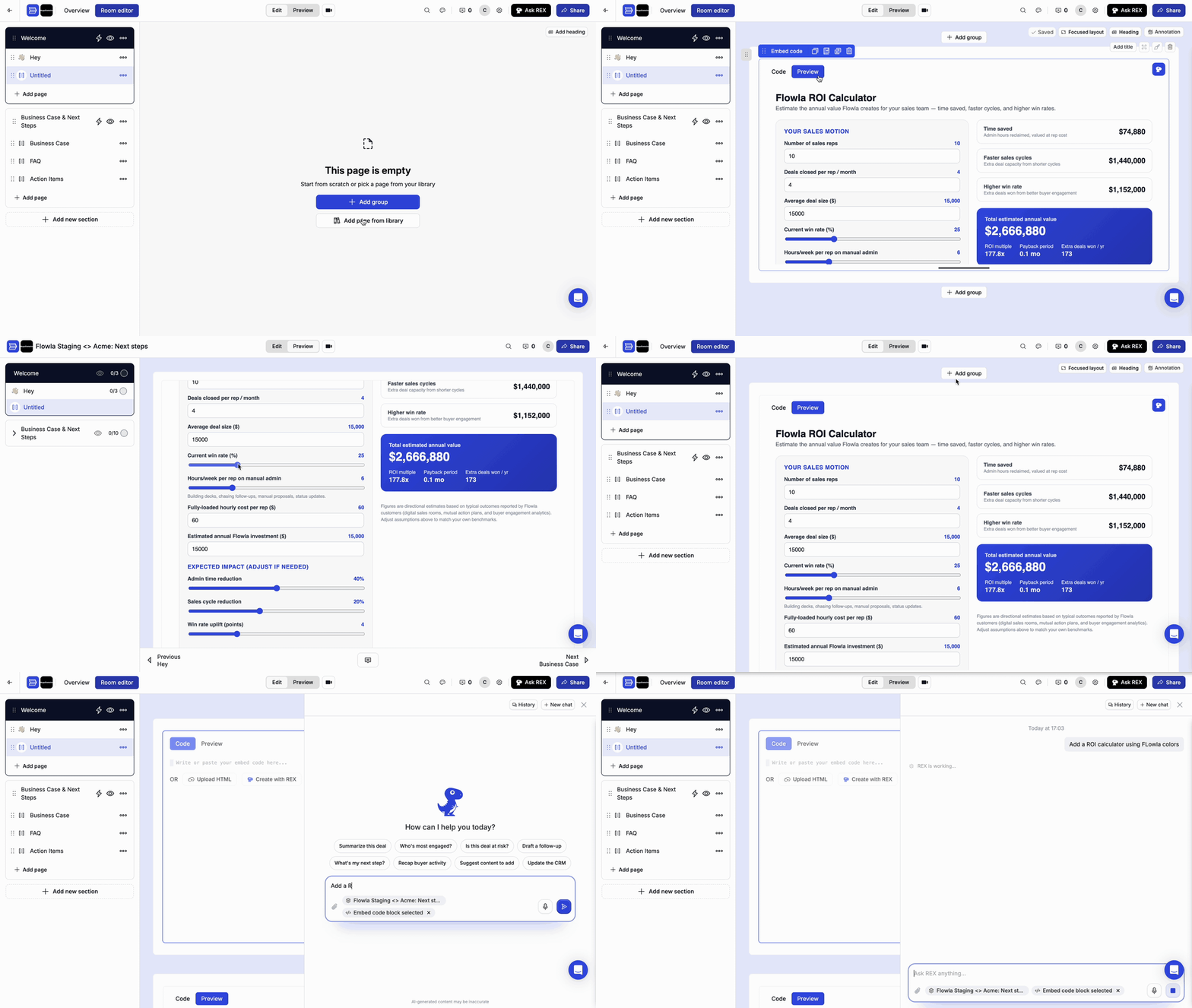 Like other blocks, you can give it a title, open it in full screen, adjust its style, duplicate it, swap it, or delete it from the block's toolbar.
***
## Troubleshooting
Adjust the block's sizing until the full content is visible, and check the **Preview** tab before publishing.
Use **Link preview** instead. It embeds any webpage as a live preview. Some sites block embedding; for those, use a link instead.
See [Pages](/rooms/room-elements/pages) for every block type you can add to a room.
This documentation is built and hosted on [Mintlify](https://mintlify.com), a developer documentation platform.
Like other blocks, you can give it a title, open it in full screen, adjust its style, duplicate it, swap it, or delete it from the block's toolbar.
***
## Troubleshooting
Adjust the block's sizing until the full content is visible, and check the **Preview** tab before publishing.
Use **Link preview** instead. It embeds any webpage as a live preview. Some sites block embedding; for those, use a link instead.
See [Pages](/rooms/room-elements/pages) for every block type you can add to a room.
This documentation is built and hosted on [Mintlify](https://mintlify.com), a developer documentation platform.