> ## Documentation Index
> Fetch the complete documentation index at: https://docs.flowla.com/llms.txt
> Use this file to discover all available pages before exploring further.
# What is a room
> Learn about rooms; branded hubs where your customer-facing processes come to life.
## TL;DR
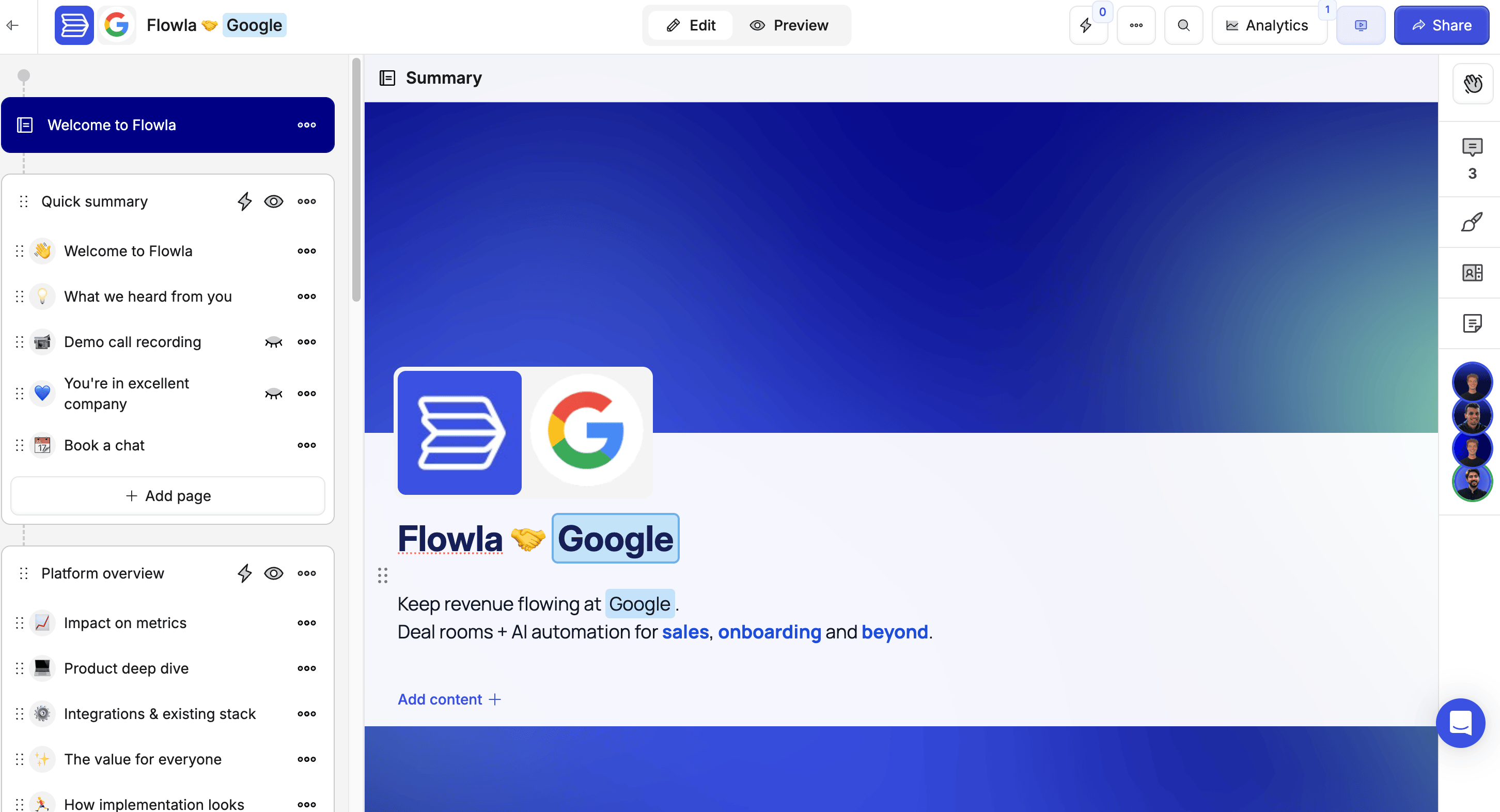
A **Room** is a shareable link you send to your customers. It holds your content, tasks, and next steps all in one branded place — and gives you real-time visibility into how they're engaging with it.
 ***
***
### Learning Objective
By the end of this article, you'll know what a Room is, what it's used for, and how it follows your relationship with a prospect — from the first demo call all the way through to onboarding.
***
### Why This Matters
Without a Room, your customer's journey is scattered — files in emails, links in chat, tasks lost in follow-up threads. Important things get missed, and you have no way to know what your customer has actually seen.
A Room fixes that. Everything lives in one easy to navigate place, your customer always knows what are the next steps, and you stay in the loop automatically.
***
### Prerequisites
No setup needed to read this overview. To create your first Room, you'll need an active Flowla account.
***
### What goes inside a Room
A Room is built from a variety of building blocks — mix and match them to fit your process:
* **Sections** — Group your room into stages (for example: "Discovery", "Proposal", "Implementation") so customers always know where they are.
* **Pages** — These sit inside each section. This is where your content lives. Add different content [blocks](/rooms/room-elements/pages): files, videos, links, embedded calendars, [forms](/forms/forms-overview), [actions](/rooms/room-elements/actions) and much more.
***
### One Room, multiple use cases
The same Room can evolve throughout your entire customer relationship, simplifying the buying journey and giving prospects all the information they need in one structured place:
1. **Deal Room** — Share proposals, case studies, and pricing during the sales cycle
2. **Onboarding Hub** — Switch it to implementation guides and training materials after the deal is closed
3. **Customer Portal** — Keep it going as an ongoing resource for renewals and expansion
Want to hide your onboarding content until after a deal is closed? You can **lock sections** and set them to unlock automatically at the right moment. [Learn how →](/rooms/room-elements/sections)
***
### How Rooms with with automations
Rooms get even more powerful when you connect them to workflows (automated sequences of actions that run in the background). Here's what you can do:
* **Auto-create Rooms** when a deal reaches a certain stage in your CRM (your customer relationship tool, like Salesforce or HubSpot)
* **Unlock sections** automatically when a customer completes a form or finishes a task
* **Get notified** when customers view key content
* **Sync your CRM** with engagement data in real-time
See [Automations](/automations/automations-overview) to learn how to set up triggers and actions.
***
You now know what a Room is and what it can do — you're ready to build your first one.
***
***
### Learning Objective
By the end of this article, you'll know what a Room is, what it's used for, and how it follows your relationship with a prospect — from the first demo call all the way through to onboarding.
***
### Why This Matters
Without a Room, your customer's journey is scattered — files in emails, links in chat, tasks lost in follow-up threads. Important things get missed, and you have no way to know what your customer has actually seen.
A Room fixes that. Everything lives in one easy to navigate place, your customer always knows what are the next steps, and you stay in the loop automatically.
***
### Prerequisites
No setup needed to read this overview. To create your first Room, you'll need an active Flowla account.
***
### What goes inside a Room
A Room is built from a variety of building blocks — mix and match them to fit your process:
* **Sections** — Group your room into stages (for example: "Discovery", "Proposal", "Implementation") so customers always know where they are.
* **Pages** — These sit inside each section. This is where your content lives. Add different content [blocks](/rooms/room-elements/pages): files, videos, links, embedded calendars, [forms](/forms/forms-overview), [actions](/rooms/room-elements/actions) and much more.
***
### One Room, multiple use cases
The same Room can evolve throughout your entire customer relationship, simplifying the buying journey and giving prospects all the information they need in one structured place:
1. **Deal Room** — Share proposals, case studies, and pricing during the sales cycle
2. **Onboarding Hub** — Switch it to implementation guides and training materials after the deal is closed
3. **Customer Portal** — Keep it going as an ongoing resource for renewals and expansion
Want to hide your onboarding content until after a deal is closed? You can **lock sections** and set them to unlock automatically at the right moment. [Learn how →](/rooms/room-elements/sections)
***
### How Rooms with with automations
Rooms get even more powerful when you connect them to workflows (automated sequences of actions that run in the background). Here's what you can do:
* **Auto-create Rooms** when a deal reaches a certain stage in your CRM (your customer relationship tool, like Salesforce or HubSpot)
* **Unlock sections** automatically when a customer completes a form or finishes a task
* **Get notified** when customers view key content
* **Sync your CRM** with engagement data in real-time
See [Automations](/automations/automations-overview) to learn how to set up triggers and actions.
***
You now know what a Room is and what it can do — you're ready to build your first one.