

How to set it up
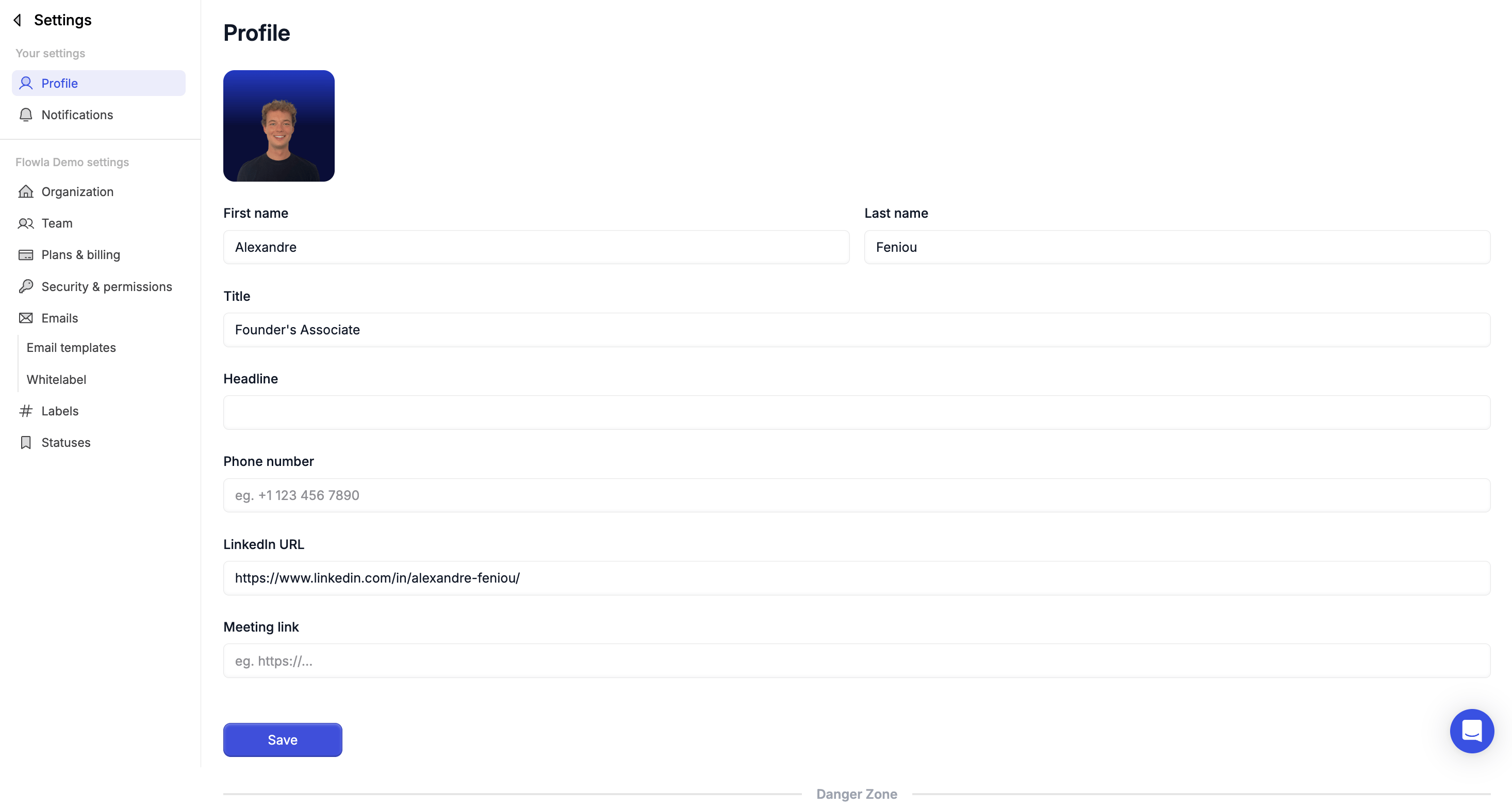
Go to Settings → Profile and complete the following fields:- First and last name
- Title (e.g. Account Executive, CSM)
- Headline (optional)
- Phone number
- LinkedIn URL
- Meeting link (for calendar booking)
- Profile picture
How your info gets used — variables
Once your profile is filled in, it powers dynamic variables in your templates. When someone on your team creates a room, Flowla automatically fills those variables using the creator’s profile — keeping every touchpoint consistent.Variable colour coding in the editor
- Blue — variable is filled correctly
- Orange — variable is missing data (go to your profile and fill in the missing field)
- In presentation mode, variables appear as normal text with no highlighting
Troubleshooting
My LinkedIn profile picture or link is showing incorrectly in a room
My LinkedIn profile picture or link is showing incorrectly in a room
Likely cause: Cached data from an old LinkedIn connection.Fix: Go to Settings > Profile and disconnect/reconnect your LinkedIn account. Allow a few minutes for the update to propagate.
How do I change my password?
How do I change my password?
Likely cause: Not obvious from the UI, especially for SSO users.Fix: Go to Settings > Profile and look for the password change option. If you signed up via Google SSO, password management is handled by Google — change it there.