

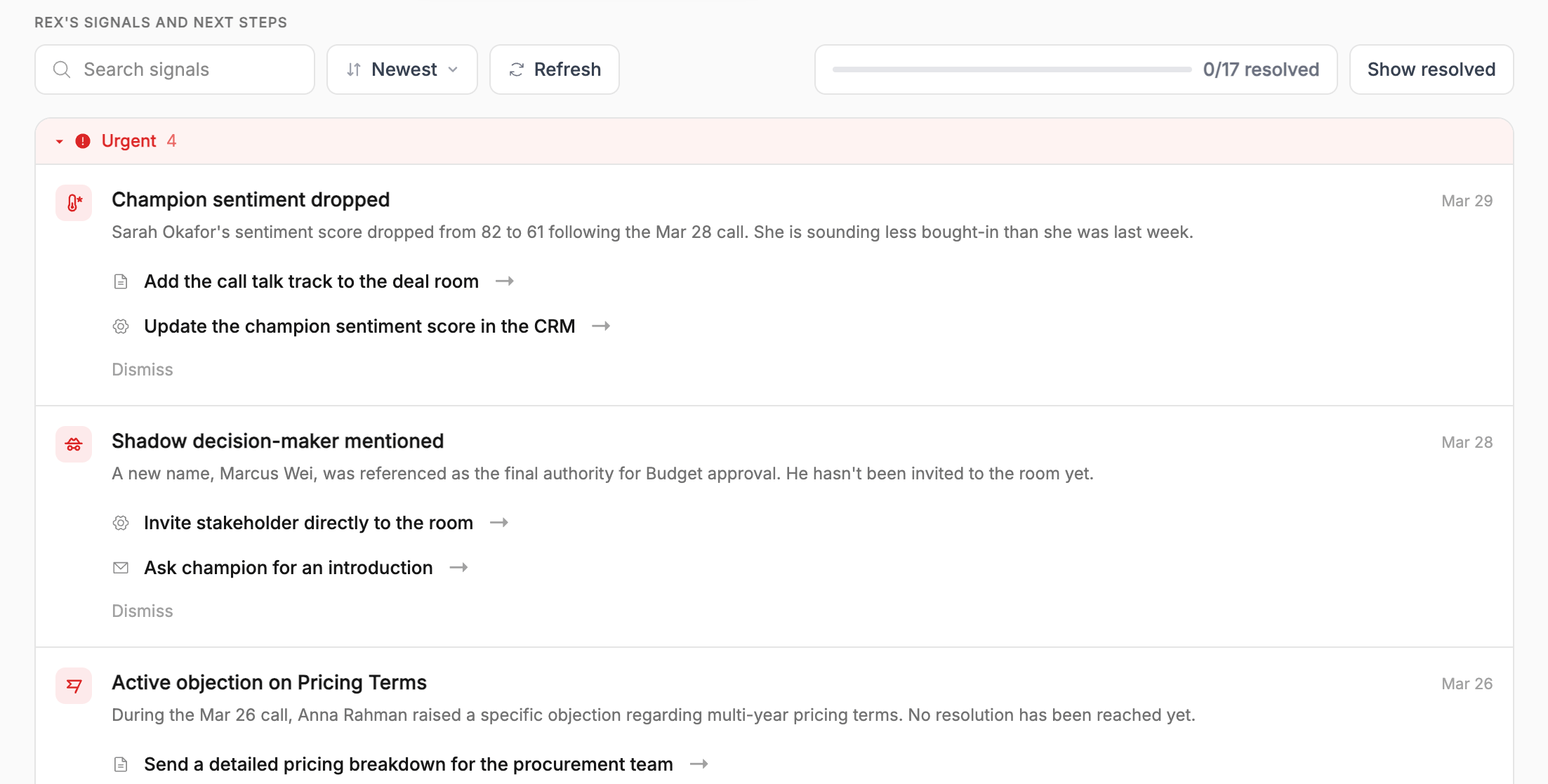
The signals feed on a room's Overview tab, grouped by urgency, with recommended actions under each signal
How a signal is built
Every signal is generated from the room’s Knowledge Graph, the same picture that drives Deal Score, MEDDPICC, and insight cards. A signal isn’t a raw alert on a single data point. It’s REX connecting evidence across a meeting, a person, and the deal’s history into one specific, worth-your-attention observation. That evidence isn’t only what happened on calls. Room engagement (who’s visited, what they looked at, how recently, how often) is just as much a source for signals as a transcript is. In practice, this is what makes the feed useful in the long stretches between meetings, when a transcript-only system would have nothing to say at all. Each signal has:- A title and description: what happened, in plain language.
- An urgency level: High, Medium, or Low, reflecting how time-sensitive REX judged it to be. The feed groups signals by urgency, most urgent first.
- A justification: what was actually said or done that triggered this, often down to the specific meeting and moment, and why it matters for this specific deal, grounded in its stakes, stakeholders, and history.
- One or more recommended actions: concrete next steps, each with a short label and a fuller description of what doing it would involve.
What shows up as a signal
The feed isn’t one type of alert. It spans everything that matters about a deal’s momentum.Recommended actions
A recommended action is never vague advice. It’s something specific enough that REX can start doing the legwork the moment you click it, the same way it would if you’d asked directly in chat. In practice, that spans:- Drafting a follow-up: a specific email to a specific stakeholder, already framed around the exact concern or opening the signal identified.
- Prepping talking points or materials: an ROI framing, a competitive comparison, an answer to a question that’s still open.
- Surfacing the right content: pulling a relevant case study, one-pager, or proof point from your library for the specific buyer persona in play, using the same asset intelligence REX Chat searches by.
- Keeping the CRM current: flagging a stage, field, or stakeholder record that’s out of sync with what’s actually happening in the deal.
- Keeping the action plan current: adding a next step that was agreed on a call but never got added, adjusting a due date, or nudging on an item that’s now overdue.
- Proposing a next step: suggesting who else should be looped in, or what the next meeting should focus on.
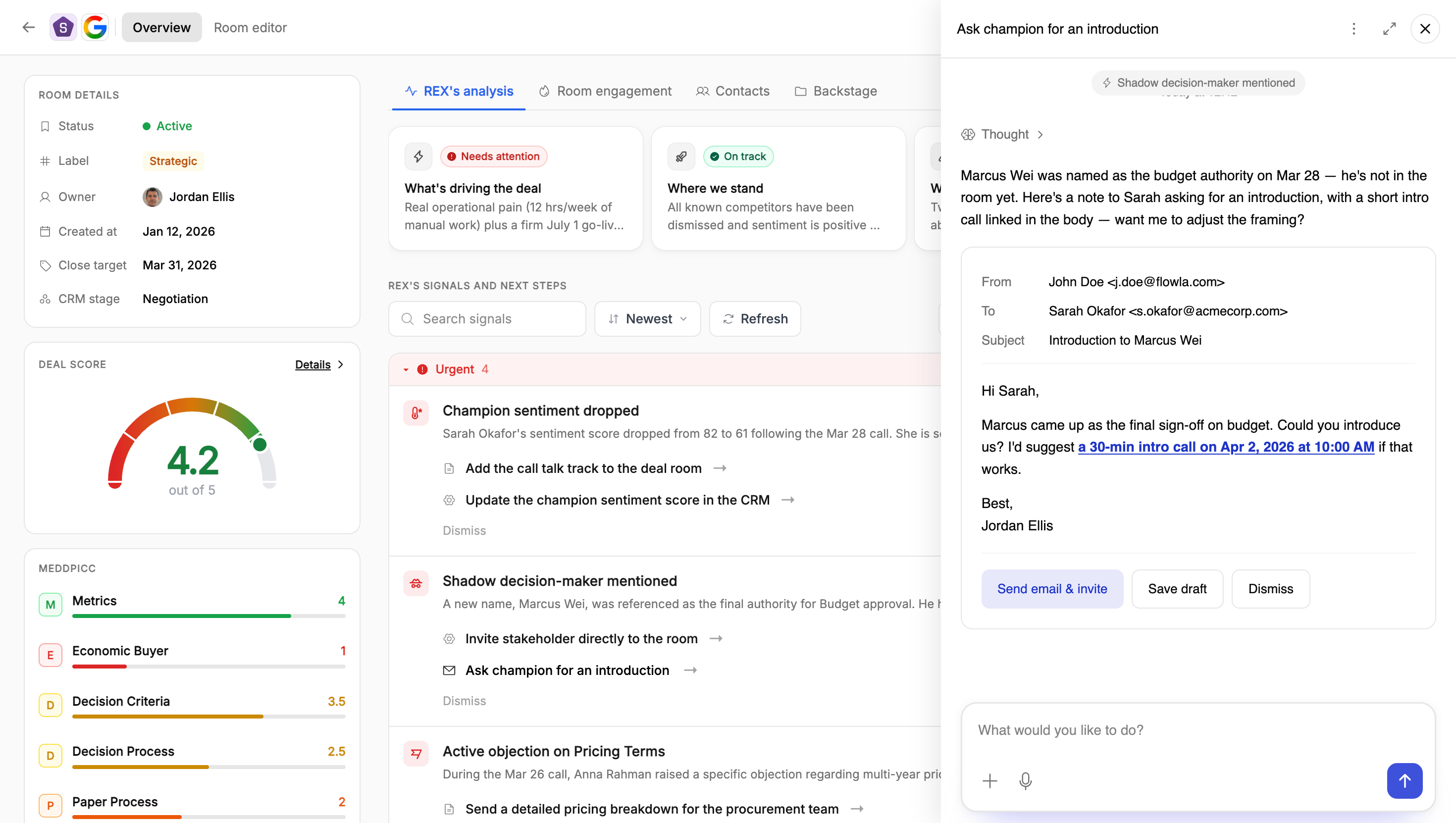
Clicking a recommended action opens REX with the email already drafted, ready to send, save as a draft, or dismiss
Working the feed
Example: a realistic worklist on a live deal
Example: a realistic worklist on a live deal
🔴 High: Security review hasn’t started, and close date is three weeks outWhat triggered it: On last week’s call, the buyer’s IT contact mentioned “we’ll need our security team to sign off before anything gets provisioned” but no one has followed up to actually start that process, and the target close date is three weeks away.Why it matters: Paperwork and security review are consistently where deals with a firm close date quietly slip. This is the kind of blocker that doesn’t show up as a “no” until it’s already too late to fix.Recommended actions:
- Kick off the security review proactively, reaching out to the IT contact with your standard security documentation before they have to ask for it.
- Confirm the close date is still realistic given the review hasn’t started, and flag it internally if it’s now at risk.
🟠 Medium: Champion hesitant to loop in Customer Success leadershipWhat triggered it: The buyer’s champion said they’re “not sure how CS leadership will react” to another new tool, given a recent rollout of a different platform on their side.Why it matters: CS is one of the strongest use cases in this deal. Without CS leadership’s buy-in, that part of the value case can’t be realised, and the champion’s hesitation is a sign of real internal friction rather than just a scheduling gap.Recommended actions:
- Offer to help the champion frame the conversation, positioning the product as reducing CS’s workload rather than adding a tool they have to learn.
- Offer a short, CS-specific walkthrough if leadership is open to a conversation, focused narrowly on the handoff and onboarding use cases.
🟡 Medium: Competitor comparison came up unpromptedWhat triggered it: The buyer mentioned they’re “also taking a look at RoutePath” for the same use case, without being asked.Why it matters: An unprompted competitor mention this late in the process is worth addressing directly rather than letting it sit unanswered.Recommended actions:
- Prepare a direct, specific comparison against RoutePath, focused on where this buyer’s stated priorities actually diverge from what RoutePath offers.
- Ask the champion directly what’s driving the comparison, so the response addresses the real concern rather than a generic feature list.
🟢 Low: Buyer had a clear aha moment on the automation demoWhat triggered it: During the product walkthrough, the buyer’s ops lead reacted strongly to seeing the manual reconciliation step disappear, saying something to the effect of “wait, that’s automatic?”Why it matters: Genuine, specific reactions like this are worth capturing and reusing. They’re more persuasive internally, in the buyer’s own words, than anything you’d write yourself.Recommended actions:
- Turn the moment into a short, reusable value story the champion can use when selling this internally.
- Lead with this reaction in the next conversation with any other stakeholder who hasn’t seen the demo yet.
🟠 Medium: A finance contact who’s never joined a call keeps revisiting the pricing sectionWhat triggered it: A contact who hasn’t attended any meeting has opened the room four times in the past week, each time spending most of the visit on the pricing and contract-terms sections.Why it matters: Someone this engaged with commercial terms, without ever having been on a call, is very likely involved in the budget decision even if they haven’t been introduced yet. That’s exactly the kind of stakeholder who can quietly stall a deal in procurement if they’re never actually looped in.Recommended actions:
- Ask the champion directly who on the finance side is reviewing pricing. This pattern strongly suggests someone is, whether or not they’ve been mentioned yet.
- Prepare a short, finance-facing summary covering pricing logic, contract terms, and ROI framing, in case this person surfaces or asks to be looped in formally.
🔴 High: Action item assigned to the buyer is six days overdueWhat triggered it: On the mutual action plan, “Share internal security questionnaire” was assigned to the buyer’s IT contact with a due date six days ago, and it’s still marked incomplete with no update.Why it matters: This is the same IT sign-off the security-review signal above depends on. An overdue item here isn’t just a scheduling slip, it’s the paper-process blocker actively getting worse in real time.Recommended actions:
- Send a friendly nudge on the specific overdue item, rather than a generic check-in, referencing what’s actually blocking progress on the buyer’s side.
- Propose a fallback next step, such as a short call to walk through the questionnaire together, in case the delay is about bandwidth rather than priority.
Read together, this is a worklist: one urgent process risk to get ahead of, one relationship to help along, one competitive question to answer head-on, one genuine win worth reinforcing, one quiet stakeholder worth surfacing before they become a surprise, and one overdue commitment to chase down. It’s exactly the kind of thing you’d otherwise have to reconstruct by rereading your own notes, guessing at who’s been in the room, and manually checking a task list.
Dismissing a signal
If a signal isn’t relevant, whether the risk doesn’t apply, the recommended action has already happened, or REX simply read the situation wrong, you can dismiss it and optionally give a reason. That reason isn’t just for the record. REX looks for patterns across what your team dismisses and uses them to make future feeds more relevant.Lifecycle of a signal
A signal starts as an open observation on your worklist. From there it moves in one of a few directions:- Resolved: you, or REX once you’ve approved a recommended action, address the underlying issue and it’s marked done.
- Dismissed: with or without a reason.
- Still open: which is itself informative. An open, high-urgency signal that’s sat untouched for a while is exactly what a manager should be asking about in a pipeline review.
Viewing signals across all rooms
Signals aren’t only visible one deal room at a time. REX’s signals, under the Intelligence section of the left-hand navigation, rolls up every signal from every room you have access to into a single list. Same signals, urgency levels, justifications, and recommended actions you’d see on an individual room’s Overview tab, just not scoped to one deal.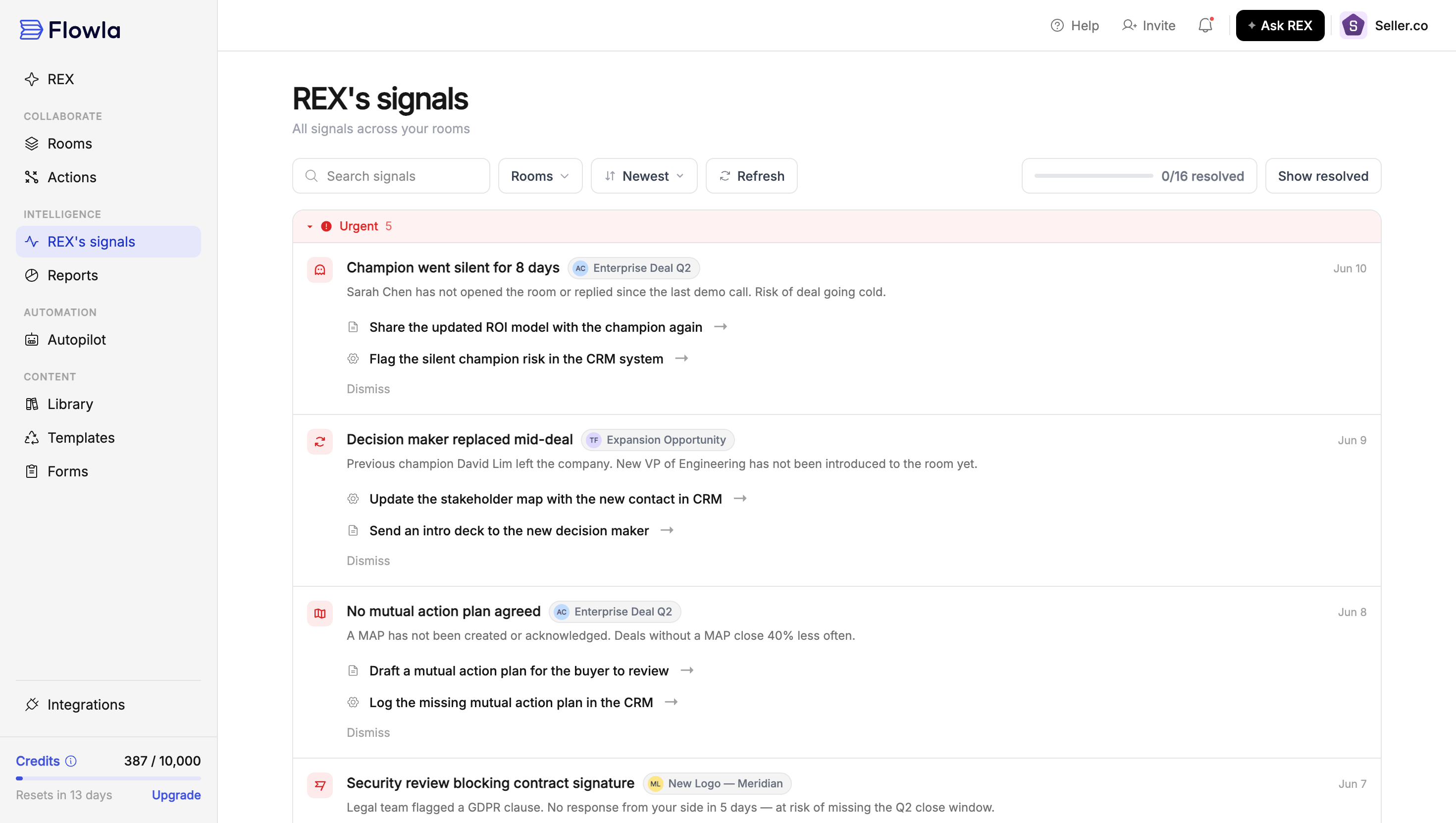
REX's signals: every signal across every room you have access to, in one queue
- Filter by room: narrow the list to one or more specific deal rooms using the Rooms filter, or leave it unfiltered to see everything across your whole book.
- Search, sort, and track resolution the same way you would inside a single room. Search by keyword, sort by newest, and see a running resolved count for whatever’s in view.
- Each signal is still tagged with the room it came from, so you can act on a recommended action without first navigating into that deal room.
How different roles use this
Sales reps
Sales reps
- Start with anything flagged High. Those are the things most likely to bite you if they sit for another week.
- Click into a recommended action rather than doing the legwork cold. REX has already grounded it in the specific evidence, so the draft or prep work starts from the right context.
- When you dismiss something, take the extra second to give a real reason. It’s not busywork, it’s the input that makes your own future feed better.
- Read the “why it matters” line, not just the title. It’s what turns “there’s an unanswered question” into “here’s specifically what it threatens.”
- Pay attention to room-activity signals specifically. They’re often your only warning between calls, telling you a deal is quietly heating up or quietly going cold before you’d otherwise notice either.
- Don’t maintain the mutual action plan by memory. REX proposes new items and flags overdue ones based on what was actually discussed, so an outdated plan is usually a sign to approve a pending update rather than go build it by hand.
Onboarding & CS teams
Onboarding & CS teams
- Expect the categories to shift in flavour. Instead of a champion going quiet pre-sale, you’ll see an admin who’s stopped logging in, a training step that never got scheduled, or a promised integration that’s now overdue.
- Room-activity signals are especially useful here. A customer contact quietly revisiting a specific how-to page, or a whole account going dark after a strong kickoff, are exactly the kind of early adoption-risk signals you’d otherwise only catch at renewal time.
- Overdue action-plan items matter just as much post-sale. A setup task assigned to the customer that’s now a week overdue is a real risk to flag, not paperwork.
- Use the org-wide REX’s signals view to triage adoption risk across your whole book of onboarding accounts, the same way a rep triages pipeline.
Managers
Managers
- Scan for high-urgency signals across your team’s pipeline to catch at-risk deals before they surface in a forecast call. The org-wide REX’s signals view is built for exactly this.
- A recommended action that was surfaced but visibly not acted on is a coaching moment, not a black mark. Ask why, since sometimes the rep knows something the signal doesn’t.
- Cross-reference the feed with the insight cards’ Obstacle and Trajectory categories when prepping for a deal review. The feed tells you what’s actionable right now, the cards give you the fuller narrative around it.
- A pattern of the same kind of signal getting dismissed across multiple reps is worth looking into. It’s a sign the default behaviour doesn’t fit how your team actually sells.
- A room-engagement signal, such as a deal gone quiet or a stakeholder suddenly active, is one of the fastest ways to catch a deal that’s about to slip before it shows up as a stage change or a missed close date.
- Overdue mutual-action-plan items, surfaced as signals, are a concrete, dated way to see whether a rep’s deal is actually progressing or just being talked about as if it is.
FAQ
What's the difference between insight cards and the signals feed?
What's the difference between insight cards and the signals feed?
Does REX ever act on a recommended action automatically?
Does REX ever act on a recommended action automatically?
What do the urgency levels mean?
What do the urgency levels mean?
What happens when I dismiss a signal?
What happens when I dismiss a signal?
Where does the evidence behind a signal come from?
Where does the evidence behind a signal come from?
How does REX pick which library asset to recommend in a signal?
How does REX pick which library asset to recommend in a signal?
Can a signal be based on room activity alone, with no meeting involved?
Can a signal be based on room activity alone, with no meeting involved?
Why did a signal get raised for something that turned out not to matter?
Why did a signal get raised for something that turned out not to matter?
Can REX create or update mutual action plan items on its own?
Can REX create or update mutual action plan items on its own?
Do I have to open a deal room to see its signals?
Do I have to open a deal room to see its signals?